Web Server
The panel's own settings — port, HTTPS-only access and boneIO Cloud registration.
The panel is served over HTTPS at https://<controller IP>:8443 by a proxy that runs on the controller.
The settings are in Settings → Access → Web Server. The defaults suit almost every installation.
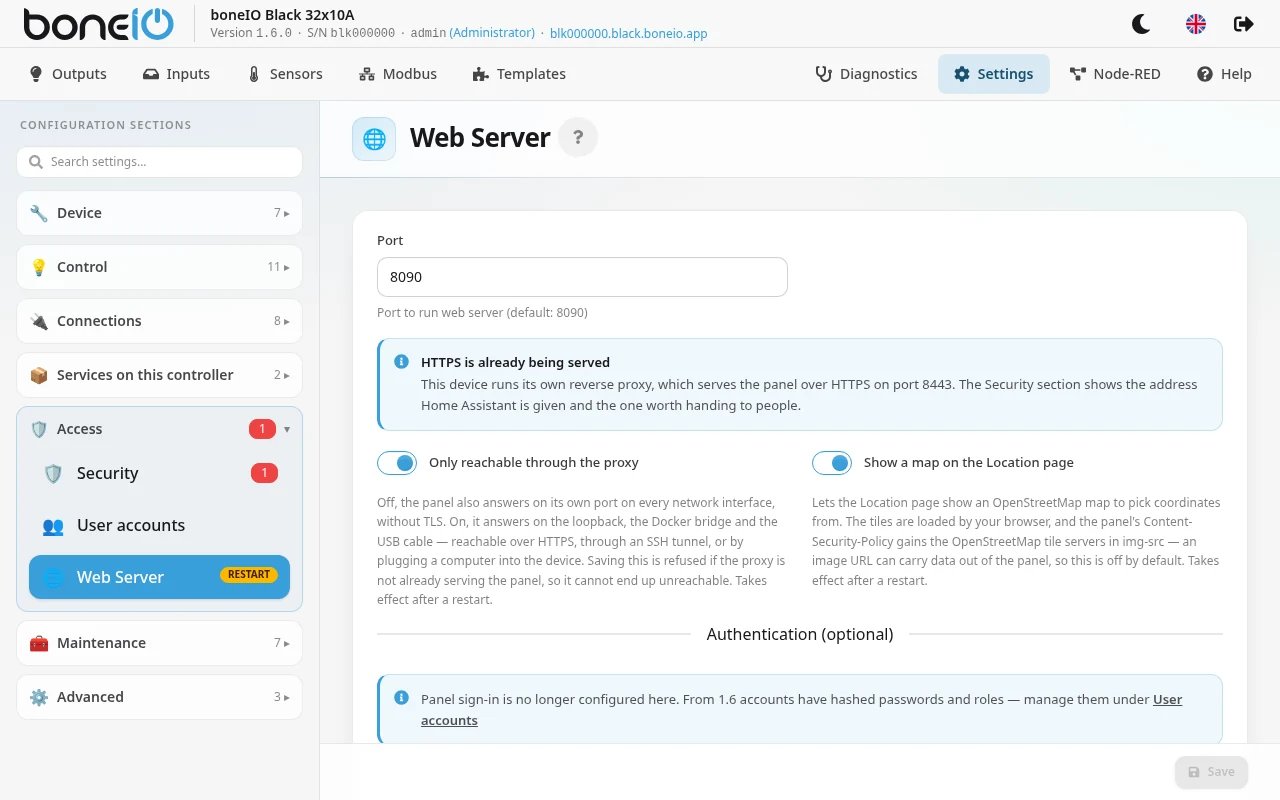
| Option | Description |
|---|---|
| Port | The port the panel itself runs on behind the proxy (default 8090). Leave it unless you know why to change it. |
| Only reachable through the proxy | Off: the panel also answers on its own port on the network, without encryption. On: only over HTTPS (:8443), an SSH tunnel or the USB cable. Saving is refused if HTTPS is not working yet, so you cannot lock yourself out. Takes effect after a restart. New controllers ship with it on. |
| Cloud Registration (PWA) | Registers the controller with boneIO Cloud: it gets its own address with a trusted certificate and can be installed as an app. See HTTPS certificate. |
| Not interested in cloud registration | Stops the panel from recommending cloud registration. |
| PWA App Name | The name under the app icon on your phone (max 12 characters). |
Panel sign-in is no longer configured here. Since 1.6 accounts are managed in Settings → Access → User accounts — see Accounts and access. Embedding the panel in other sites is set in Settings → Access → Security.