Events
A wall button that tells single, double, triple and long presses apart — and the full list of actions an input can run.
An event input is for a push button. The controller tells the click types apart — single, double, triple, long, and three sequences such as double, then hold — and each can run its own actions. Actions run on the controller itself, so a button keeps switching its light when the network or Home Assistant is down.
Every click is also published to MQTT, and Home Assistant shows the input as an Event entity (Home Assistant 2023.8 or newer).
For a sensor with two states — motion, reed switch, flood — use a binary sensor instead. Both are edited in the same place, see Local Inputs.
Adding an event
- Open Settings → Control → Local Inputs
- Click Add New (or the edit icon next to an existing input)
- At the top of the form set Type to Events
- Fill in the tabs described below and save
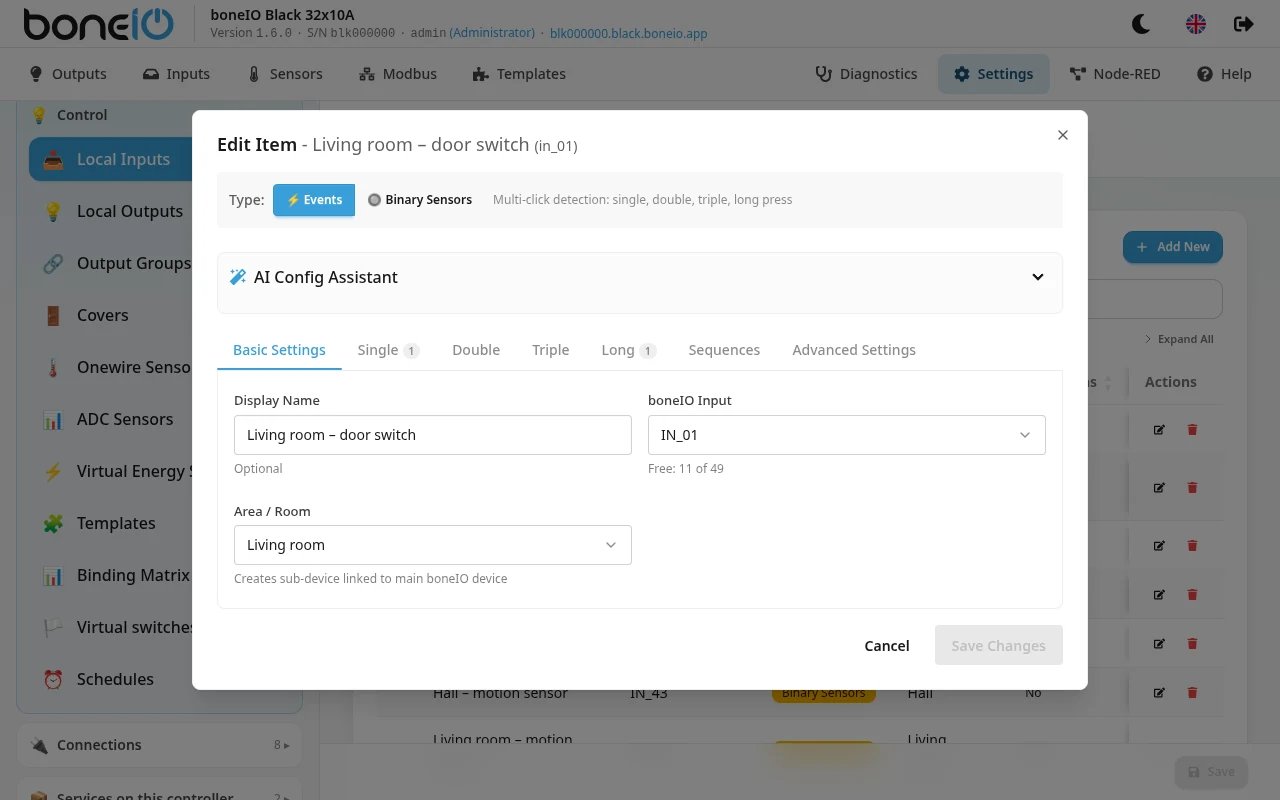
Basic Settings
| Field | What it does |
|---|---|
| Display Name | Name shown in the panel, MQTT and Home Assistant. Optional. |
| boneIO Input | The physical input, e.g. IN_04. Inputs already taken by another event or binary sensor are listed under the field as Used. |
| Area / Room | Puts the input into an area, which becomes a sub-device in Home Assistant. |
Single / Double / Triple / Long
One tab per click type. On each tab click Add Action and choose what should happen — see Actions below.
The Triple tab only works after Enable Triple Click is switched on in Advanced Settings; the tab warns you if it is off.
Sequences
A sequence is a combination of clicks:
| Sequence | Meaning |
|---|---|
| Double + Long | double click, then hold |
| Single + Long | single click, then hold |
| Double + Single | double click, then one more click |
Each sequence can have its own actions. The MQTT tick box next to a sequence decides whether that sequence is also published to MQTT (and Home Assistant) — it is off by default.
Advanced Settings
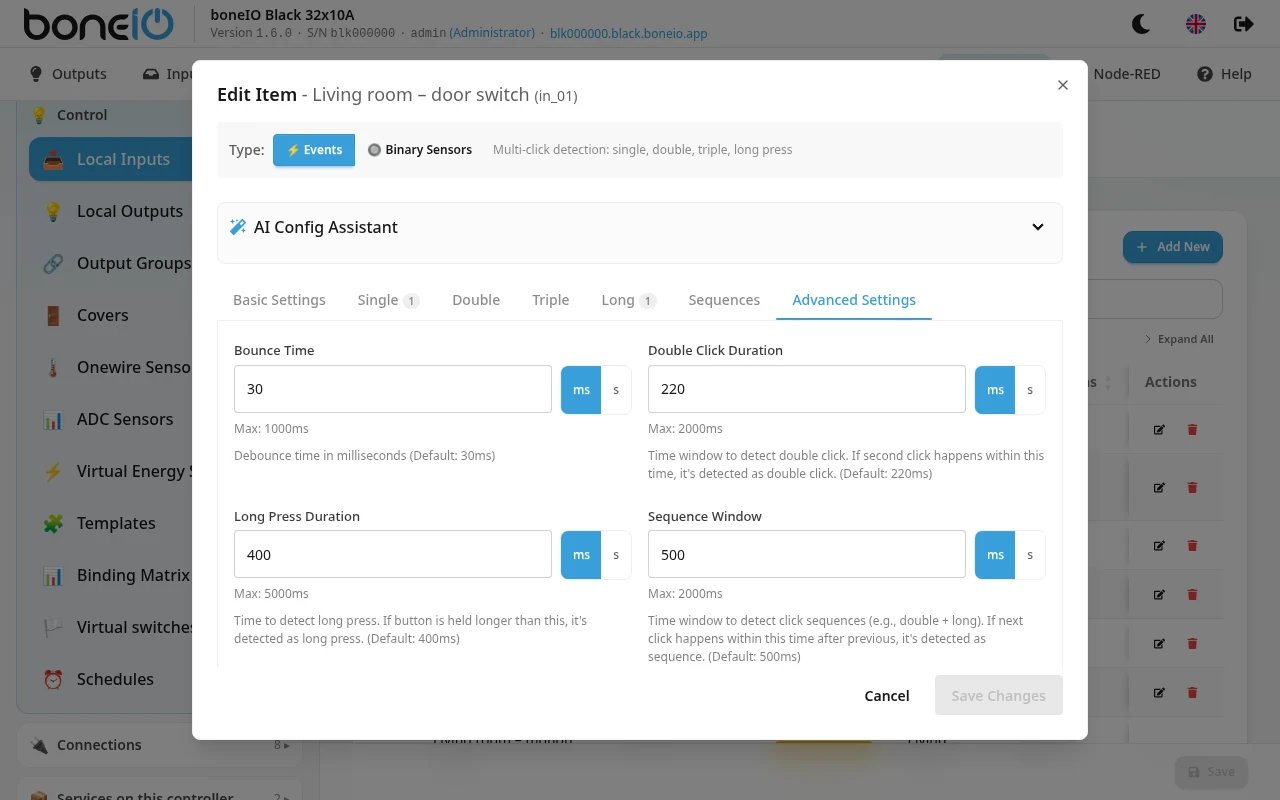
| Field | Default | What it does |
|---|---|---|
| Bounce Time | 30ms | Ignores contact bounce. Raise it only if one press is seen as two. |
| Double Click Duration | 220ms | How long the controller waits for a second click. |
| Long Press Duration | 400ms | How long the button must be held to count as a long press. |
| Sequence Window | 500ms | How long the controller waits for the next part of a sequence. |
| Sequence Mode | Exclusive | Exclusive: single, double and long are held back for the sequence window; if a sequence is recognised, only the sequence fires. Immediate: single, double and long fire at once, and a sequence fires in addition. |
| Enable Triple Click | off | Turns on triple-click detection. |
| Long Press MQTT Mode | Single | Single: only the first long-press message is sent to MQTT. Periodic: a message every 200ms while the button is held, with the growing duration. |
| Max Long Press Duration | 30s | Safety stop: a long press is ended after this time even if the release was missed. It cannot be more than 30s. |
Restore Defaults puts all timings back to the values above.
Double Click Duration must be shorter than Long Press Duration — the form warns you otherwise. With Sequence Mode: Exclusive (the default) every single click waits for the sequence window before it acts. If a button feels slow and you use no sequences, switch to Immediate.
Actions
This is the list of everything an input can do. The same actions are used by binary sensors, remote inputs and schedules.
In the panel each action has an Action Type and the fields for that type. The ▶ button (Test Action) runs the action right away, so you can check it without pressing the button.
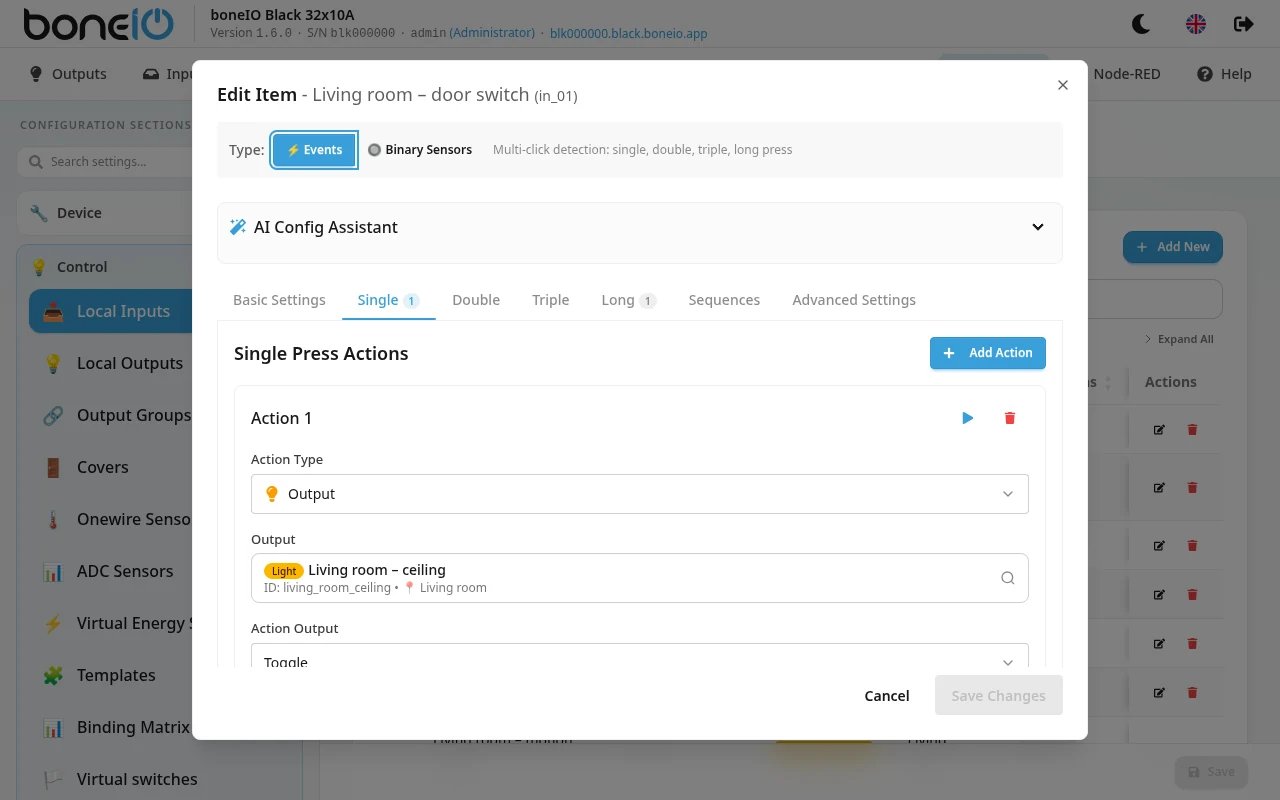
Action types
| In the panel | In YAML (action:) | What it does | Fields |
|---|---|---|---|
| Output | output | Switches an output or an output group of this controller. | boneio_output, action_output |
| Cover | cover | Moves a cover of this controller. | boneio_cover, action_cover |
| Virtual Switch | virtual_switch | Sets a virtual switch (ON, OFF or TOGGLE). | boneio_virtual_switch, action_output |
| MQTT | mqtt | Sends any message to any MQTT topic. | topic, action_mqtt_msg |
| Output over MQTT | output_over_mqtt | Switches an output of another boneIO through the broker. | boneio_id, boneio_output, action_output |
| Cover over MQTT | cover_over_mqtt | Moves a cover of another boneIO through the broker. | boneio_id, boneio_cover, action_cover |
| Control Remote Output | remote_output | Switches an output of a remote device (ESPHome, WLED, another boneIO). | remote_device, output_id, action_output |
| Control Remote Cover | remote_cover | Moves a cover of a remote device. | remote_device, cover_id, action_cover |
Output, Cover and Virtual Switch need no network. The other types need the MQTT broker or the remote device to be reachable.
boneio_id is the ID of the other boneIO — the prefix of its MQTT topics.
Output actions (action_output)
TOGGLE(default),ON,OFF— for every output, output group and virtual switch.
A dimmable light on a remote device (an ESPHome light with brightness, or WLED) offers more. The panel only lists them when the chosen light supports them:
| Value | What it does |
|---|---|
BRIGHTNESS_UP / BRIGHTNESS_DOWN | Brighter / dimmer by one step. Up from off switches the light on at the first step; down from the first step switches it off. |
BRIGHTNESS_UP_CYCLE / BRIGHTNESS_DOWN_CYCLE | As above, but wraps round from 100% to the lowest step (and back). |
SET_BRIGHTNESS | Sets the brightness given in brightness. |
CYCLE_COLOR | Each press moves to the next colour in colors. |
CYCLE_PRESET | Each press moves to the next effect in presets. |
Extra fields for these lights:
- brightness (0–255) — for
SET_BRIGHTNESS, or the brightnessONandTOGGLEswitch on with. - brightness_step (1–50, percent, default 10) — the step of the four
BRIGHTNESS_*actions. - colors — a list of
[R, G, B]colours, e.g.[[255, 0, 0], [0, 0, 255]]. - presets — a list of effect names (ESPHome) or effect numbers (WLED).
- rgb — a colour
[R, G, B]; color_temp — colour temperature in mireds (153 cool … 500 warm), for lights that support it. - transition — how long the change takes, e.g.
500ms.
Cover actions (action_cover)
| Value | What it does |
|---|---|
TOGGLE (default) | Open or close, depending on the last movement. |
OPEN / CLOSE / STOP | As named. |
TOGGLE_OPEN | Alternates open and stop. |
TOGGLE_CLOSE | Alternates close and stop. |
SMART_TOGGLE | Like TOGGLE, but a cover at or below Always open till (%) (data.always_open_till, 0–100) always opens. |
TILT | Sets the slats to Tilt Position (%) (data.tilt_position: 0 closed, 100 open). |
TILT_OPEN / TILT_CLOSE | Opens / closes the slats. |
The three tilt actions are for venetian blinds only; the panel shows them only when a venetian blind is chosen.
Restore tilt after movement (restore_tilt) remembers the slat angle before the move and puts it back afterwards — also venetian blinds only.
Conditions
Any action can be limited to certain circumstances. In the panel open Conditions under the action and click Add Condition.
| Condition Type | YAML type: | True when |
|---|---|---|
| Time Range | time | the time is between after and before (HH:MM); a range such as 22:00–06:00 over midnight works. |
| Date Range | date | the date is between after and before (MM-DD); a range over New Year works. |
| Entity State | state | an entity (entity + entity_id) is in state: is_on, is_off, is_open or is_closed. |
| Sun | sun | the Sun is between two events (e.g. sunset and sunrise, each with an optional offset), in a phase of the day, or at an elevation. Needs a location. |
For Entity State the entity can be a binary sensor, cover, output, light, virtual switch, remote input, remote output or remote cover (binary_sensor, cover, output, light, virtual_switch, remote_input, remote_output, remote_cover).
With more than one condition choose the Condition Mode: AND (all must pass, the default) or OR (any must pass).
Delay
Delay execution (delay) waits before running the action, for example to switch a light off 2 minutes after the motion sensor goes quiet.
Cancel delay on events (delay_cancel_on) lists the events on the same input that cancel the waiting action: pressed, released, single, double, long.
A typical pair: on Released switch the light off with a 2-minute delay, cancelled on pressed — new motion keeps the light on.
In the panel the delay is offered on binary sensor actions (Pressed / Released).
Repeat on Hold
On the Long tab an action can Repeat on Hold (repeat): it runs again and again while the button is held, at most every Repeat Interval (repeat_interval, default 800ms, not less than 200ms). Useful with BRIGHTNESS_UP / BRIGHTNESS_DOWN.
Chance of running
probability (0–1, YAML only) runs the action only some of the time: 0.7 is seven times out of ten. It is drawn after the conditions have passed. Meant for presence simulation.