Binary Sensors
Digital inputs used in the controller, presented as a Binary sensor in Home Assistant. They send MQTT messages for pressed and released actions.
Web application configuration
Recommended configuration method.
Sample webui configuration

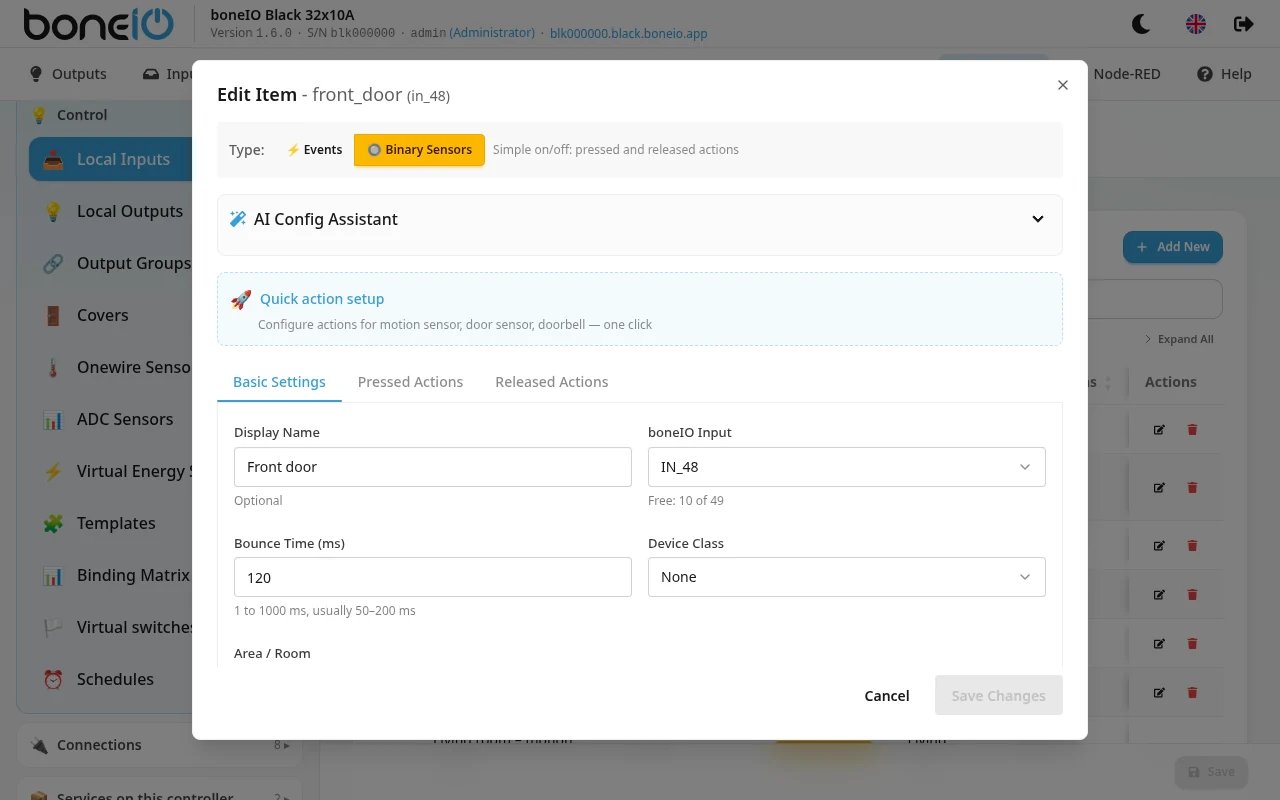
View allowing for a preview of defined binary inputs, a preview of assigned actions, and the addition of new binary inputs. Additionally, it allows for their export and import.
Basic Settings

| Option Name | Description |
|---|---|
| Display Name | The name with which the input will be displayed in the controller's webui, MQTT, and HA. |
| boneIO Input | Selection of the physical input of the controller. |
| Area/Room | Selection of the appropriate area. |
| Bounce time | Defines the time between subsequent action triggers. |
| Device Class | Defines the type of device the output will identify as in HA. |
| Show in Home Assistant | Allows hiding the input in HA. |
| Inverted | Checking this will "invert" the state of the sensor. |
| Initial send | Checking this will send the sensor state at application startup (useful in reed switch.) |
| Clear message after processing | The action property is cleared immediately after sending the message to force a change in the sensor state and allow for re-triggering of automations in Home Assistant. |
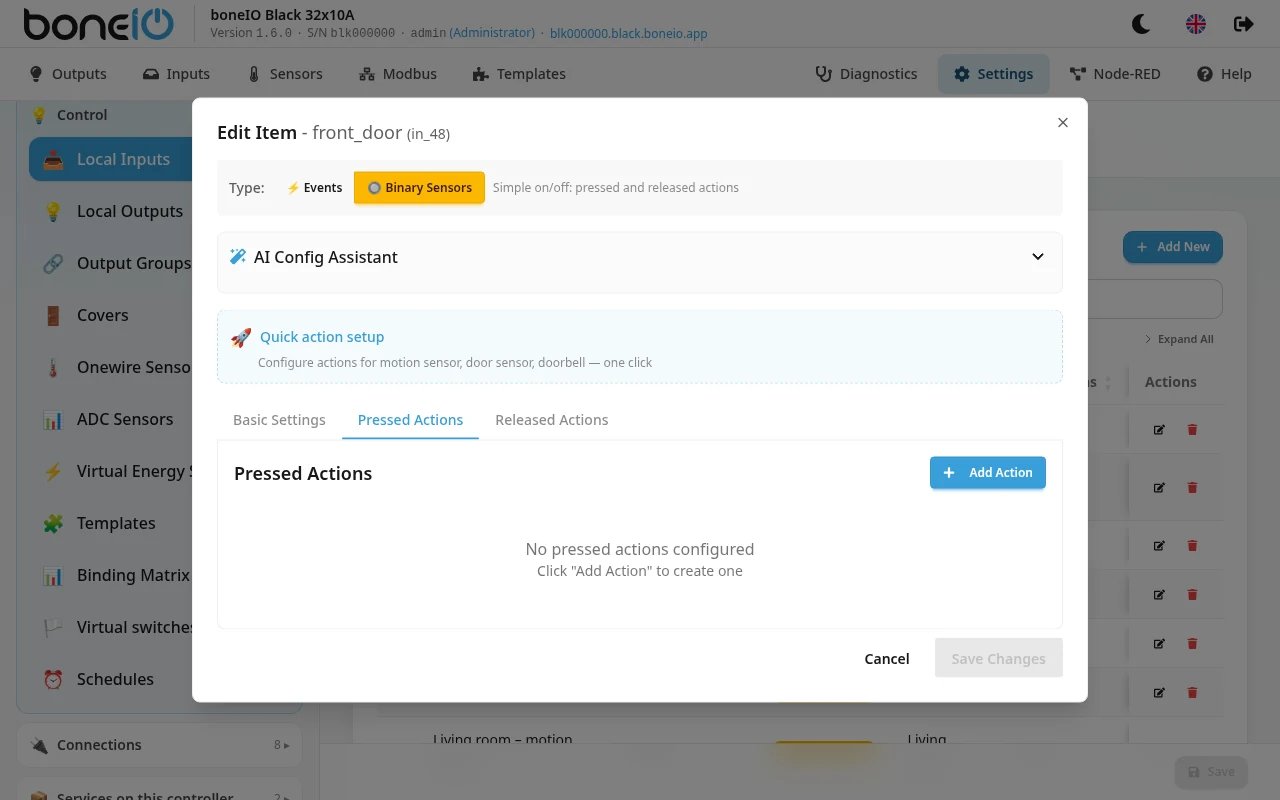
Pressed Actions / Released Actions

Action type - Opens a list of defined actions (available here). Depending on the selected action type, the available options change. Their list is in the tables below.
Output Action:
| Option Name | Description |
|---|---|
| Output | Selection of a specific output. |
| Output Action | Type of action to perform, e.g., the most common "Toggle". |
Cover Action:
| Option Name | Description |
|---|---|
| Cover | Selection of a specific cover/shutter. |
| Cover Action | Type of action to perform, e.g., the most common "Toggle". |
Cover Over Mqtt Action:
| Option Name | Description |
|---|---|
| Cover | Selection of a specific cover/shutter. |
| Cover Action | Type of action to perform, e.g., the most common "Toggle". |
| boneIO ID | ID of the boneIO controller where we want to perform the action. |
| Cover ID (pin) | ID of the chosen Cover. |
| Cover Action | Type of action to perform, e.g., the most common "Toggle". |
Mqtt Action:
| Option Name | Description |
|---|---|
| MQTT Topic | Address of the MQTT topic. |
| MQTT Message | The MQTT message that the action should execute. |
For Output Over Mqtt action:
| Option Name | Description |
|---|---|
| boneIO ID | ID of the boneIO controller where we want to perform the action. |
| Output ID (pin) | ID of the chosen Output. |
| Output Action | Type of action to perform, e.g., the most common "Toggle". |
For Remote Output action:
| Option Name | Description |
|---|---|
| Remote Device | Name of the remote device the action concerns. |
| Output ID | ID of the output the action concerns. |
| Output Action | Type of action to perform, e.g., the most common "Toggle". |
For Remote Cover action:
| Option Name | Description |
|---|---|
| Remote Device | Name of the remote device the action concerns. |
| Cover ID | ID of the cover the action concerns. |
| Cover Action | Type of action to perform, e.g., the most common "Toggle". |
YAML Editor
Sample configuration
- name: IN_01
boneio_input: IN_01
actions:
pressed:
- action: output
boneio_output: OUT_01Configuration variables:
-
name Name of the input defined by us in MQTT and Home Assistant.
-
boneio_input (Optional, string, default) - Name of the boneIO controller input. Use underscore for spaces.
-
pin (Required, string) - GPIO pin ID on the Beaglebone board, e.g.,
P9_33. -
actions (Optional, dictionary) - Dictionary of predefined actions ([pressed, released]).
-
clear_message (Optional, boolean, default: False) - Decides whether to send an empty message to MQTT after a pressed/released callback. Same as Zigbee2Mqtt does in button actions.
-
bounce_time (Optional, timeperiod, default: 120 ms) - Debounce time for GPIO before the callback. Use if the default value does not work for you. Setting it too high may interfere with "click" type events for the
switchkind. -
show_in_ha (Optional, boolean, default: True) - Send autodiscovery message to Home Assistant.
-
device_class (Optional, string, allowed_values:
['battery', 'battery_charging', 'carbon_monoxide', 'cold', 'connectivity', 'door', 'garage_door', 'gas', 'heat', 'light', 'lock', 'moisture', 'motion', 'moving', 'occupancy', 'opening', 'plug', 'power', 'presence', 'problem', 'running', 'safety', 'smoke', 'sound', 'tamper', 'vibration', 'window']) - Type of device to be visible in Home Assistant. -
inverted (Optional, boolean, default: False) - Inverts the sensor input value displayed in MQTT.
-
initial_send (Optional, boolean, default: False) - If set to true, the initial status of the binary sensor will be sent to MQTT during application startup.
-
kind (Optional, string, default: switch, allowed_values:
['switch', 'sensor']) - Type of device to send to Home Assistant. This kind indicates which actions you can use.
Actions
- pressed (Optional, list): List of actions to perform if the sensor is pressed.
- released (Optional, list): List of actions to perform if the sensor is released.
Action variables for action list
- action (Optional, string, default: output, allowed_values:
['mqtt', 'output', 'cover']) - Action type. 'Output' and 'cover' mean the command is sent directly to the output relay or cover. This mode does not require a network to function. 'Mqtt' means an additional action is sent to MQTT. For example, you can directly control a second boneIO! - pin (Optional, string) - Output pin ID where the action is to be performed. Use only with
outputorcoveraction types. - topic (Optional, string) - Topic to use if
mqttaction is selected. - action_cover (Optional, string, allowed_values:
['toggle', 'open', 'close', 'stop', 'toggle_open', 'toggle_close']) - Action to perform for thecoveraction type.togglecycles between open/close.toggle_openalternates between open/stop,toggle_closealternates between close/stop. - action_output (Optional, string, allowed_values:
['toggle', 'on', 'off']) - Action to perform for theoutputaction type. - action_mqtt_msg (Optional, string) - Message to send to the MQTT topic if the action is
mqtt.