Irrigation
Water garden zones one after another, on a schedule, with water sources and pump timing.
The Irrigation template waters a garden zone by zone. Each zone is one valve on one controller output; the controller opens them one after another for the time you set, switches on the water supply — a main valve, a pump — while they run, and starts the whole cycle on its own at the times you schedule.
It runs on the controller itself, so the garden is watered on time without Home Assistant or the network.
The parts
- Controller — one irrigation template: its zones, its water sources and its schedules. Most gardens need one.
- Zones — each zone opens one valve for its Run Duration. Zones run in the order of the list, never two at once (except for the short Valve Overlap, if you set one).
- Water sources — what has to be on for water to flow: a main valve, a pump, or both. A source can switch several outputs one after another. If you have more than one — mains water and a rainwater tank — you choose which one is used on the Irrigation tile or in Home Assistant; only one is used at a time.
- Schedules — a time and days (daily, weekdays, weekend or one day of the week). At that time the controller starts a full cycle. The time is the controller's local time.
A zone can also run only every Nth cycle (Run Every), so the drip line under the hedge gets water every third time while the lawn gets it every time.
Setting one up
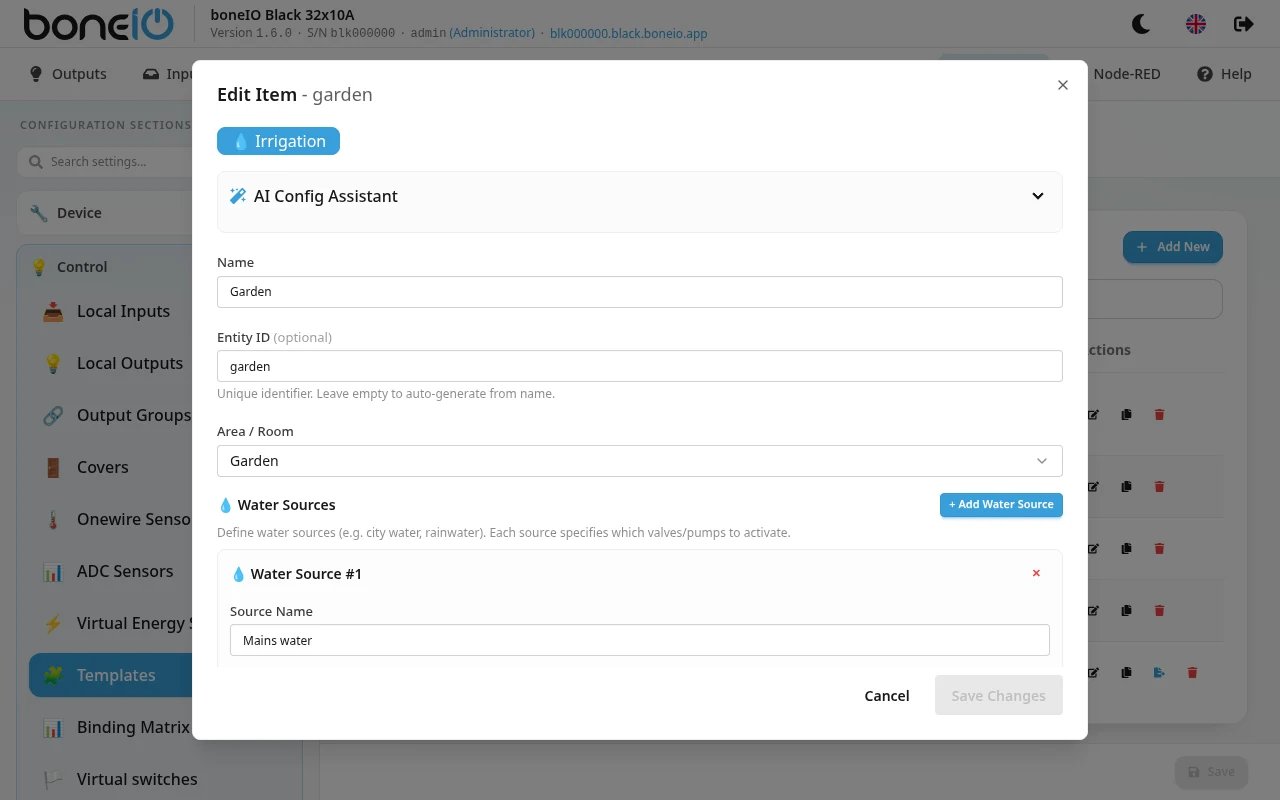
First make the valve outputs: in Settings → Control → Local Outputs set the type of each zone valve's output to Valve. Only outputs of that type can be picked as a zone valve. Pumps and main valves can be any type except light or cover.
- Open Settings → Control → Templates, click Add New and choose Irrigation
- Fill in Name, Entity ID (optional — made from the name) and Area / Room
- Under Water Sources, click Add Water Source for each supply and pick its Outputs (valves/pumps). Skip this if the zone valves alone are enough
- Under Zones, click Add Zone for each valve: Zone Name, Valve Output, Run Duration, Run Every. The arrows (Move up / Move down) set the order
- Under Schedules, click Add Schedule and set the time and the days
- Save
Zones
| Field | What it does |
|---|---|
| Zone Name | Shown on the tile and in Home Assistant. |
| Entity ID | Made from the name if left empty. |
| Valve Output | The output that opens this zone's valve. Required. |
| Run Duration | How long the zone runs in one cycle, e.g. 10min. At least one minute. |
| Run Every | Run the zone every Nth cycle: 1 = every time, 2 = every other time, and so on. |
| Zone enabled | A disabled zone is skipped. |
Water sources
| Field | What it does |
|---|---|
| Source Name | E.g. City Water, Rainwater tank. |
| Outputs (valves/pumps) | The outputs switched on when this source is used. At least one. |
| Sequential Output Delay → Delay between ON / Delay between OFF | With several outputs, they switch on one by one with this pause between them, and off in reverse order. Useful to open the main valve before the pump starts. |
| Pump Delays | The order of source and zone valve at the start and end — see below. |
| Turn off pump during valve delay | Switches the source off during the Valve Open Delay between two zones. |
Pump Delays — set at most one of each pair:
| Field | Start / end of a zone |
|---|---|
| Pump Start (pump delay) | The zone valve opens first, the source switches on after this delay. |
| Pump Start (valve delay) | The source switches on first, the zone valve opens after this delay. |
| Pump Stop (pump delay) | The zone valve closes first, the source switches off after this delay. Protects a pump from running against a closed valve for long. |
| Pump Stop (valve delay) | Meant for the opposite order. In 1.6 the zone valve is always closed before the source is switched off, so this only adds a wait after the source is off. |
Advanced Pump/Valve Timing
| Field | What it does |
|---|---|
| Valve Open Delay | A pause between one zone's valve closing and the next one opening. Prevents pressure drops. |
| Valve Overlap | The next valve opens this long before the current one closes. Prevents water hammer. Do not set both. |
| Pause Timeout | A paused cycle is stopped after this long. Default 30min; 0 keeps it paused indefinitely. |
If an output of the water source or a zone valve cannot be switched on because an interlock blocks it, the controller stops the cycle, switches off what it had turned on, and reports it (an event in Home Assistant).
Using it
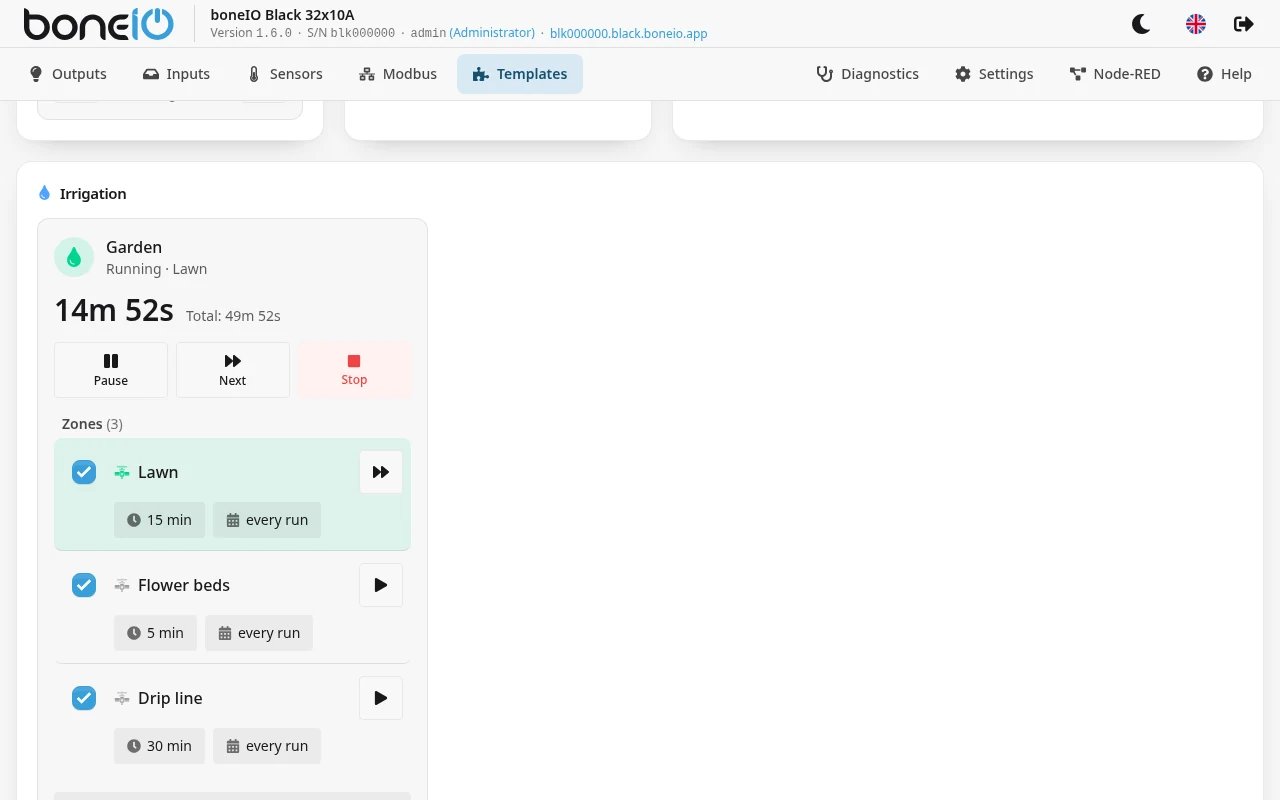
The controller has a tile on the Templates page (see Templates page). It shows the state — Idle, Running or Paused — the time left in the current zone, the Next Run, and each zone with its duration and how often it runs.
- Start cycle runs the whole list; Pause, Resume, Skip to next zone and Stop control a running cycle.
- Start this zone only runs one zone and stops.
- Clicking a zone's duration or frequency changes it; the zone's switch enables or disables it.
- Schedules and settings opens a window with the schedules (each can Skip its next run), Skip next scheduled run, and the settings below.
Settings on the tile (also in Home Assistant):
| Setting | What it does |
|---|---|
| Duration multiplier | Scales every zone's time: 1.0 = as set, 0.5 = half, 2.0 = double. Handy in a heat wave. |
| Repeat Cycle | 0 = run the list once, 1 = twice, and so on. |
| Auto-advance zones | On: after one zone the next starts. Off: the cycle stops after the first zone. |
| Reverse zone order | Runs the list from the bottom up. |
| Standby | Nothing starts — neither the schedule nor Start cycle or Start this zone only — until it is turned off again. The tile says so. |
| Water Source | With more than one source, which one is used. |
What you change on the tile or in Home Assistant is remembered and wins over the configuration: a zone's duration, frequency and on/off state, the multiplier, repeat, auto-advance, reverse, standby and the chosen water source. Changing the same value in the form later has no effect on a controller that has already had it set on the tile — change it on the tile.
A few things to know:
- Start cycle counts as a cycle for Run Every, just like a scheduled run. Start this zone only does not.
- With Skip next scheduled run on, the next full cycle is skipped — also one started with Start cycle.
- The schedule starts a cycle even if one is already running: the running cycle is stopped first.
In Home Assistant
Each controller is one device with these entities:
| Entity | What it is |
|---|---|
| switch (controller name) | Starts and stops a full cycle. |
| switches Skip Next Run, Standby | As on the tile. |
| switches Auto Advance, Reverse | Only with more than one zone. |
| numbers Multiplier (0.1–5.0), Repeat (0–10) | As on the tile. |
| buttons Pause, Resume, Next Valve | Next Valve only with more than one zone. |
| sensors Zone End Time, Next Run | When the running zone ends and when the next scheduled run starts. |
| select (water source) | Only with more than one water source. |
| event | Reports a finished cycle, a start blocked by standby, and an interlock fault. |
| per zone: a valve, a switch … Enabled, a number … Duration (minutes) | Open or close one zone, enable it, change its time. |
| per schedule: a switch Schedule N Skip | Skip that schedule's next run. |
From the list in Settings → Control → Templates, the irrigation row has a button that copies a ready Home Assistant dashboard for this controller (Sections layout) to the clipboard.