boneIO
The controller's identity - name, hardware version, device type and serial number.
This section tells the application what controller it runs on: its name, the hardware version of the controller and the device type. Open Settings → Device → boneIO.
This section carries the restart badge. After Save, the panel shows App restart required. Click Restart Now, or nothing changes.
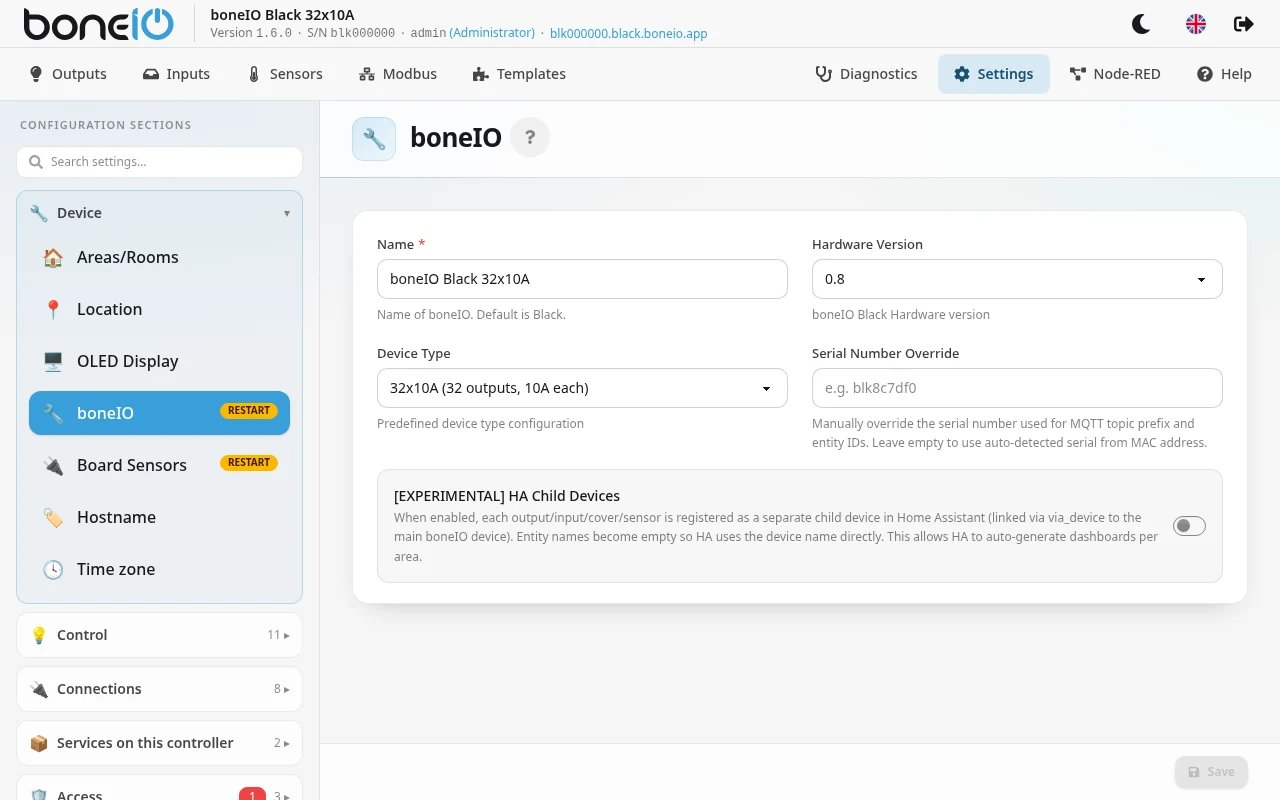
| Field | What it does |
|---|---|
| Name | The controller's name, shown in the panel, in Home Assistant and on other boneIO controllers. Required once a hardware version or device type is chosen. |
| Hardware Version | The version of the controller, printed on the label on the side of the housing. It decides which pins and chips the application expects. |
| Device Type | Which model this is: 32x10A, Cover or Cover Mix. The older 32x5A, 24x16A and 48x4A models are listed as DISCONTINUED. |
| Serial Number Override | Leave empty. Used only when a replacement controller has to take over the identity of an old one (see below). |
| [EXPERIMENTAL] HA Child Devices | Registers every output, input, cover and sensor as a separate device in Home Assistant (see below). Off by default. |
Hardware version
The wrong version means inputs, outputs or sensors of the controller do not work. Pick the one on the label:
| Version | What the controller has |
|---|---|
| 0.2, 0.3 | MCP9808 temperature sensor, no power monitor. Modbus on uart1. |
| 0.4 – 0.7 | LM75 temperature sensor, INA219 power monitor. Modbus on uart4. |
| 0.8 | Like 0.7, but the output expanders are at different addresses. |
| 1.0 | INA226 power monitor instead of INA219, built-in 1-Wire bridge. |
| 1.1 | Like 1.0, plus a buzzer. |
The buzzer exists only on 1.1. It is used like any other output, with boneio_output: buzzer. A 1.0 configuration that asks for it is rejected when it loads.
Changing the device type
Changing the Device Type can leave your configuration pointing at outputs or inputs the new model does not have. The panel checks this at once. If there is a conflict, the Device Type Change Warning window lists the Incompatible outputs and Incompatible inputs.
Under Load Example Configuration you can tick which files to replace with the example configuration for the new model
(output.yaml, event.yaml, binary_sensor.yaml, cover.yaml) and click Load & Apply. Your current files are backed up first.
Then restart the application.
To start from a default working configuration for a device type, use Settings → Maintenance → Factory reset.
Serial number override
The serial number is made from the controller's MAC address, for example blk8c7df0. It is part of every MQTT topic and every Home Assistant entity ID.
A replacement controller (for example after a warranty exchange) has a different one, so Home Assistant would see it as a new device.
If you type the old controller's serial number into Serial Number Override, the new controller uses it, and your Home Assistant entities, dashboards and automations keep working.
The format is blk followed by six characters 0-9 / a-f.
When you restore a backup made on a controller with a different serial number, the panel asks the same question itself (Keep Old Serial).
Two controllers with the same serial number on one MQTT broker get in each other's way. Use the override only on the controller that replaces the old one.
HA child devices
Experimental: this may change or disappear in a future version.
Normally Home Assistant sees the controller as one device with many entities. With [EXPERIMENTAL] HA Child Devices on, every output, input, cover and sensor becomes its own device, linked to the controller. Home Assistant can then build dashboards per area on its own.
Child Device Naming Style appears when the switch is on:
- Default (entity name only, e.g. OUT 17): may give duplicate names if you have several boneIO controllers with the same output names,
- Device name + entity (e.g. boneIO Black - OUT 17),
- Device name + area + entity (e.g. boneIO Black - Gabinet - OUT 17): falls back to the device name if no area is assigned.
Before switching it on or off, click Remove all HA devices in MQTT, so the old entries do not stay behind in Home Assistant. The devices come back in the new form after the restart.