ADC Sensors
Reading analog sensors on the controller's analog inputs.
The controller has 7 analog inputs (ADC). They measure a voltage, so you can connect sensors that report a value rather than just on/off. Each input you set up here becomes a sensor in the panel and, if you want, in Home Assistant.
The highest voltage an analog input accepts is 1.8 V. For a sensor with a higher output, use an external voltage divider. See the hardware installation page for your model, for example boneIO Black 32x10A.
Adding an ADC sensor
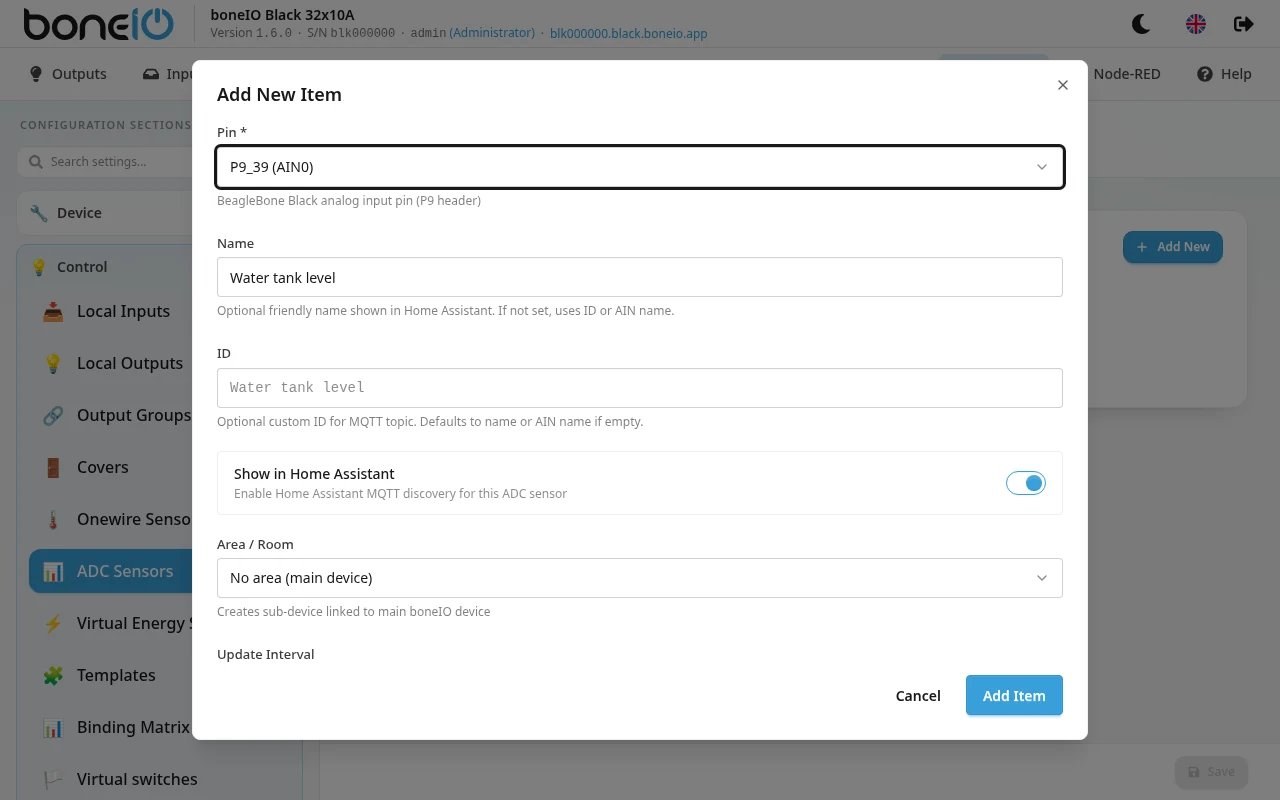
- Open Settings → Control → ADC Sensors and add a new entry.
- Choose the Pin. The list shows each pin with its analog channel, for example
P9_39 (AIN0). Pins already used by another sensor are marked in use. - Optionally fill in Name (shown in Home Assistant) and ID (used in the MQTT topic). If you leave them empty, the pin's analog channel name is used.
- Optionally choose an Area / Room.
- Leave Show in Home Assistant on if the sensor should appear there.
- Set Update Interval, how often the value is read. Default 60 s.
- Adjust the Filters if needed (see below) and click Save.
Changes apply without a restart.
Filters
The input itself gives a number from 0 to 1. The filters turn that into something useful and are applied in the order they are listed. The default, multiply by 1.8 and then round to 2 decimals, gives the voltage at the pin in volts.
On controllers from version 1.0 (the ones with a SERVICE port) every input has an input stage that divides the terminal voltage by about 7.7. Set multiply to 13.8 instead of 1.8 to read the voltage on the terminal (0–13.8 V). See Analog inputs.
Available filters: offset, round, multiply, filter_out, filter_out_greater, filter_out_lower.
Add one with Add Filter. What each filter does is described in Filters.