MCP9808 temperature sensor
The temperature sensor built into boneIO Black controllers of version 0.2 and 0.3.
The MCP9808 is the temperature sensor inside the earliest boneIO Black controllers, versions 0.2 and 0.3, at I2C address 0x18. It reports the temperature of the controller itself, not of the room.
Controllers from version 0.4 have an LM75 instead, so if yours is newer, this page is not for you.
Which version you have is printed on the label on the side of the housing; see boneIO for what each version contains.
When the factory configuration is applied to a 0.2 or 0.3 controller, it already contains this sensor, named Board temperature.
Where it is in the panel
Open Settings → Device → Board Sensors. The list holds all sensors built into the controller.
The section has the restart badge: a change takes effect only after the application restarts.
Adding or editing the sensor
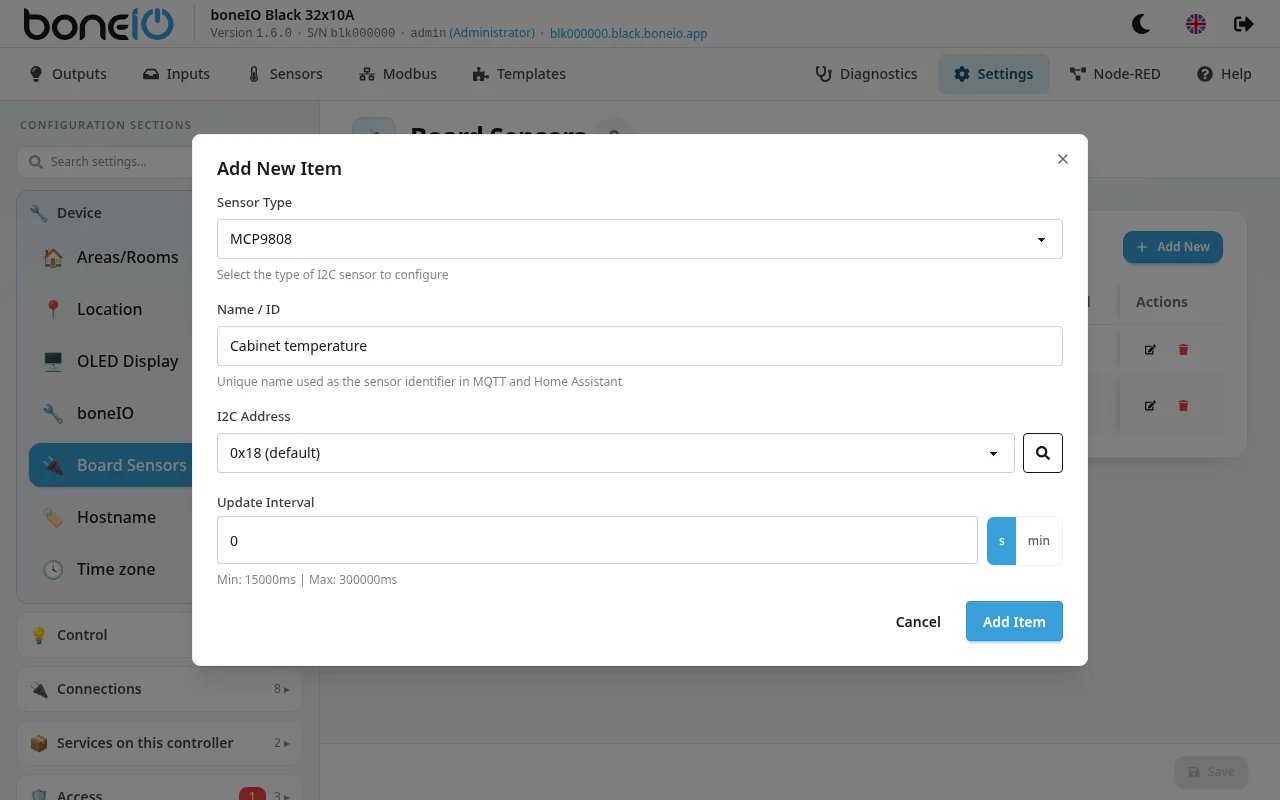
- Open Settings → Device → Board Sensors and click Add New (or the edit icon next to the existing sensor).
- Set Sensor Type to MCP9808.
- Fill in Name / ID, for example
Board temperature. - Choose the I2C Address.
0x18is the address used in boneIO Black. The magnifier button next to it (Scan I2C bus) looks for sensors on the bus and marks the addresses it finds as detected. - Set the Update Interval if 60 s does not suit you.
- Click Add Item (Save Changes when editing), then Save.
- The panel shows App restart required. Click Restart Now.
| Field | What it does |
|---|---|
| Sensor Type | MCP9808 for this sensor. It cannot be changed on an existing entry: to change the type, delete the entry and add a new one. |
| Name / ID | Name of the sensor in the panel and Home Assistant. Required. Spaces are removed for the MQTT ID, so Board temperature becomes Boardtemperature. |
| I2C Address | 0x18 (default) to 0x1F. An address can be used by only one sensor in this list, of any type; the panel marks taken addresses in use. |
| Update Interval | How often the temperature is read: from 15 s to 5 min. On a new entry the field shows 0; left like that, the default 60 s is used. |
The reading is rounded to 2 decimals. Other filters, such as an offset, and the unit can be set only in YAML (see below). The temperature also appears on the Uptime screen of the OLED display.
Renaming the sensor changes its ID, so Home Assistant sees a new entity: dashboards, automations and history that use the old one have to be pointed at the new one.
If the sensor does not answer at the chosen address, the controller does not create it and the panel lists it in Settings → Maintenance → Hardware errors. Use Scan I2C bus to see which address it really has.