Local inputs
Event
Digital inputs used in the controller, presented as an Event entity in Home Assistant. Only works with Home Assistant version 2023.8 and newer! The Event entity sends an MQTT message for single, double, triple, long press actions, as well as action sequences.
Web application configuration
Recommended configuration method.
Sample webui configuration

View allowing for a preview of defined event entities, a preview of assigned actions, and the addition of new event entities. Additionally, it allows for their export and import.
Basic settings

| Option Name | Description |
|---|---|
| Display Name | The name with which the input will be displayed in the controller's webui, MQTT, and HA. |
| boneIO Input | Selection of the physical input of the controller. |
| Area/Room | Selection of the appropriate area. |
Single / Double / Triple / Long

Action type - Opens a list of defined actions (available here). Depending on the selected action type, the available options change. Their list is in the tables below.
Output Action:
| Option Name | Description |
|---|---|
| Output | Selection of a specific output. |
| Output Action | Type of action to perform, e.g., the most common "Toggle". |
Cover Action:
| Option Name | Description |
|---|---|
| Cover | Selection of a specific cover/shutter. |
| Cover Action | Type of action to perform, e.g., the most common "Toggle". |
Cover Over Mqtt Action:
| Option Name | Description |
|---|---|
| Cover | Selection of a specific cover/shutter. |
| Cover Action | Type of action to perform, e.g., the most common "Toggle". |
| boneIO ID | ID of the boneIO controller where we want to perform the action. |
| Cover ID (pin) | ID of the chosen Cover. |
| Cover Action | Type of action to perform, e.g., the most common "Toggle". |
Mqtt Action:
| Option Name | Description |
|---|---|
| MQTT Topic | Address of the MQTT topic. |
| MQTT Message | The MQTT message that the action should execute. |
For Output Over Mqtt action:
| Option Name | Description |
|---|---|
| boneIO ID | ID of the boneIO controller where we want to perform the action. |
| Output ID (pin) | ID of the chosen Output. |
| Output Action | Type of action to perform, e.g., the most common "Toggle". |
For Remote Output action:
| Option Name | Description |
|---|---|
| Remote Device | Name of the remote device the action concerns. |
| Output ID | ID of the output the action concerns. |
| Output Action | Type of action to perform, e.g., the most common "Toggle". |
For Remote Cover action:
| Option Name | Description |
|---|---|
| Remote Device | Name of the remote device the action concerns. |
| Cover ID | ID of the cover the action concerns. |
| Cover Action | Type of action to perform, e.g., the most common "Toggle". |
Sequences

The sequence view allows performing similar actions as the previous ones (single, double, etc.). In the case of sequences, after selecting the MQTT option - sequence action will be send in mqtt
Advanced Settings

| Option Name | Description |
|---|---|
| Bounce Time | Default 30ms - the time between consecutive calls. |
| Double Click Duration | Time window to detect a double click (Default 220ms) - defines the time in which two single clicks one after another will be interpreted as a double click. |
| Long Press Duration | Time window after which holding the button will be defined as a long press. (Default 220ms) |
| Sequence Window | Time window to detect a sequence of clicks (Default 500ms). |
| Enable Triple Click | Enables detection of triple clicks. |
| Sequence Mode - Enabled | Means that base events are delayed. Allows detection and execution of only sequences / - Disabled - Base events are executed immediately, sequences are detected as additional events. |
| Sequence Mode - Disabled | Base events are executed immediately, sequences are detected as additional events. |
YAML Editor
Sample configuration
event:
- boneio_input: in_29
name: Kitchen Button
actions:
single:
- action: output
boneio_output: OUT_01
action_output: toggleConfiguration variables:
-
name (string) - Display name in Home Assistant.
-
boneio_input (Optional, string) - Reference to a predefined input configuration (e.g., in_01, in_02).
-
area (Optional, string) - Reference to an area ID defined in the
areassection. Creates a sub-device associated with the main BoneIO device. -
id (Optional, string) - Technical identifier used in MQTT topics and actions.
- If
boneio_inputis set:idis optional (defaults toboneio_inputvalue). - If
boneio_inputis NOT set:idis REQUIRED. - If both are set:
idoverridesboneio_inputas the identifier.
- If
-
Available only when the
boneio:section is configured. Used as the default ID if theidfield is not specified. -
pin (Optional, string) - GPIO pin ID on the Beaglebone board, e.g.,
P9_33. Not needed when usingboneio_input. -
gpio_mode (Optional, string, default:
gpio, allowed_values:['gpio', 'gpio_pu', 'gpio_pd', 'gpio_input']) - How to initialize this GPIO. gpio means default gpio mode. gpio_pu = gpio pull up, gpio_pd = gpio pull down, gpio_input - to be checked. -
clear_message (Optional, boolean, default: False) - Decides whether to send an empty message to MQTT after a pressed/released callback. Same as Zigbee2Mqtt does in button actions. Up to version 0.6.x, this was 'true' by default.
-
bounce_time (Optional, timeperiod, default: 30ms) - Debounce time for GPIO in milliseconds. For advanced use only.
-
double_click_duration (Optional, timeperiod, default: 220ms) - Time window in milliseconds to detect a double click. If a second click occurs within this time, it will be detected as a double click.
-
long_press_duration (Optional, timeperiod, default: 400ms) - Time in milliseconds to detect a long press. If the button is held longer than this time, it will be detected as a long press.
-
show_in_ha (Optional, boolean, default: True) - Send autodiscovery message to Home Assistant.
-
device_class (Optional, string, default: button, allowed_values:
["button", "doorbell", "motion"]) - Type of device to be visible in Home Assistant. -
inverted (Optional, boolean, default: False) - Inverts the sensor input value displayed in MQTT.
-
actions (Optional, dictionary) - Dictionary of predefined actions ([single, double, long]).
Configuration variables that can be omitted if using boneio: and boneio_input: configuration:
- pin (Required, string) - GPIO pin ID on the Beaglebone board, e.g.,
P9_33. - gpio_mode (Optional, string, default:
gpio, allowed_values:['gpio', 'gpio_pu', 'gpio_pd', 'gpio_input']) - How to initialize this GPIO. gpio means default gpio mode. gpio_pu = gpio pull up, gpio_pd = gpio pull down, gpio_input - to be checked.
Actions
- single (Optional, list): List of actions to perform if the switch is pressed once.
- double (Optional, list): List of actions to perform if the switch is double-clicked.
- long (Optional, list): List of actions to perform if the switch is long-pressed.
Action variables for action list
- action (Optional, string, default: output, allowed_values:
['mqtt', 'output', 'cover']) - Action type. 'Output' and 'cover' mean the command is sent directly to the output relay or cover. This mode does not require a network to function. 'Mqtt' means an additional action is sent to MQTT. For example, you can directly control a second boneIO! - boneio_output (Optional, string) - Reference to the output ID where the action is to be performed. Use with
outputaction type. Recommended over the deprecatedpinfield. - boneio_cover (Optional, string) - Reference to the cover ID where the action is to be performed. Use with
coveraction type. Recommended over the deprecatedpinfield. - pin (Deprecated, string) - Older field for output/cover ID. Use
boneio_outputorboneio_coverinstead. - topic (Optional, string) - Topic to use if
mqttaction is selected. - action_cover (Optional, string, allowed_values:
['toggle', 'open', 'close', 'stop', 'toggle_open', 'toggle_close']) - Action to perform for thecoveraction type.togglecycles between open/close.toggle_openalternates between open/stop,toggle_closealternates between close/stop. - action_output (Optional, string, allowed_values:
['toggle', 'on', 'off']) - Action to perform for theoutputaction type. - action_mqtt_msg (Optional, string) - Message to send to the MQTT topic if the action is
mqtt.
Binary
Digital inputs used in the controller, presented as a Binary sensor in Home Assistant. They send MQTT messages for pressed and released actions.
Web application configuration
Recommended configuration method.
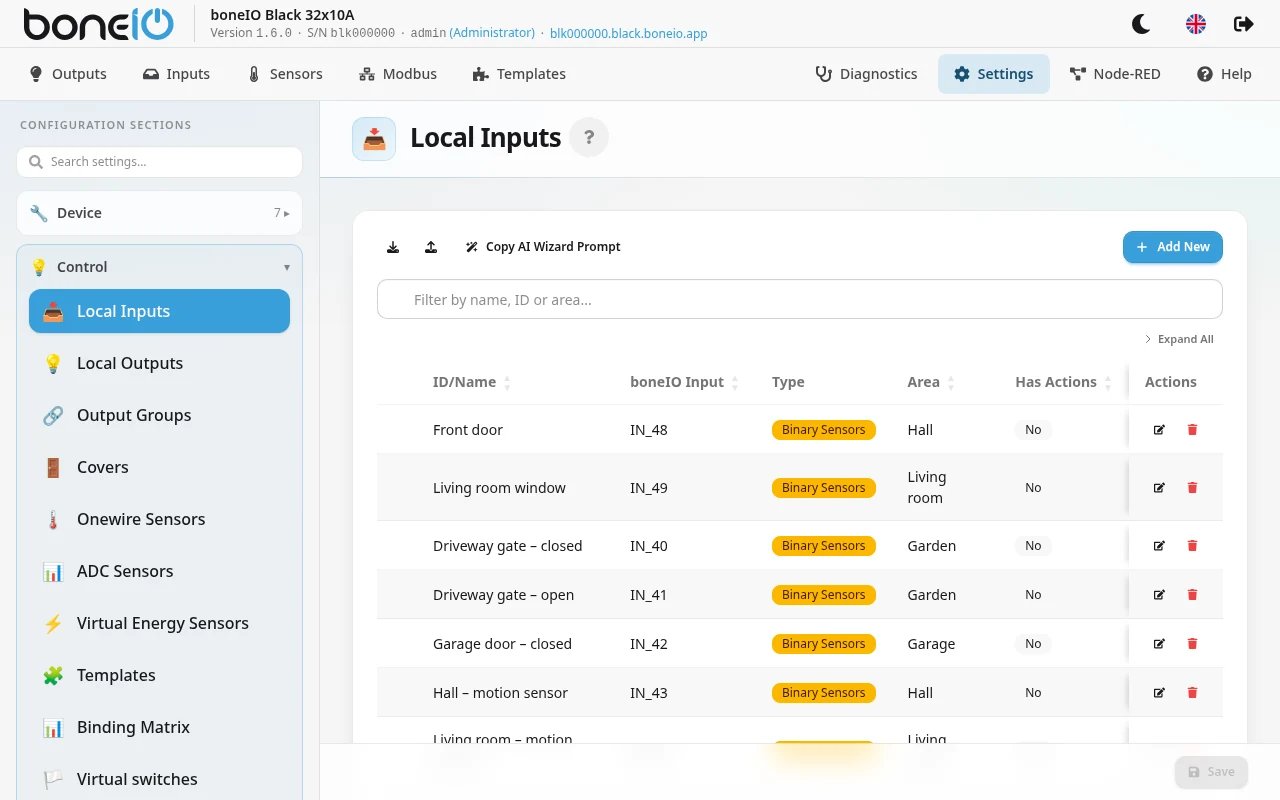
Sample webui configuration

View allowing for a preview of defined binary inputs, a preview of assigned actions, and the addition of new binary inputs. Additionally, it allows for their export and import.
Basic Settings

| Option Name | Description |
|---|---|
| Display Name | The name with which the input will be displayed in the controller's webui, MQTT, and HA. |
| boneIO Input | Selection of the physical input of the controller. |
| Area/Room | Selection of the appropriate area. |
| Bounce time | Defines the time between subsequent action triggers. |
| Device Class | Defines the type of device the output will identify as in HA. |
| Show in Home Assistant | Allows hiding the input in HA. |
| Inverted | Checking this will "invert" the state of the sensor. |
| Initial send | Checking this will send the sensor state at application startup (useful in reed switch.) |
| Clear message after processing | The action property is cleared immediately after sending the message to force a change in the sensor state and allow for re-triggering of automations in Home Assistant. |
Pressed Actions / Released Actions

Action type - Opens a list of defined actions (available here). Depending on the selected action type, the available options change. Their list is in the tables below.
Output Action:
| Option Name | Description |
|---|---|
| Output | Selection of a specific output. |
| Output Action | Type of action to perform, e.g., the most common "Toggle". |
Cover Action:
| Option Name | Description |
|---|---|
| Cover | Selection of a specific cover/shutter. |
| Cover Action | Type of action to perform, e.g., the most common "Toggle". |
Cover Over Mqtt Action:
| Option Name | Description |
|---|---|
| Cover | Selection of a specific cover/shutter. |
| Cover Action | Type of action to perform, e.g., the most common "Toggle". |
| boneIO ID | ID of the boneIO controller where we want to perform the action. |
| Cover ID (pin) | ID of the chosen Cover. |
| Cover Action | Type of action to perform, e.g., the most common "Toggle". |
Mqtt Action:
| Option Name | Description |
|---|---|
| MQTT Topic | Address of the MQTT topic. |
| MQTT Message | The MQTT message that the action should execute. |
For Output Over Mqtt action:
| Option Name | Description |
|---|---|
| boneIO ID | ID of the boneIO controller where we want to perform the action. |
| Output ID (pin) | ID of the chosen Output. |
| Output Action | Type of action to perform, e.g., the most common "Toggle". |
For Remote Output action:
| Option Name | Description |
|---|---|
| Remote Device | Name of the remote device the action concerns. |
| Output ID | ID of the output the action concerns. |
| Output Action | Type of action to perform, e.g., the most common "Toggle". |
For Remote Cover action:
| Option Name | Description |
|---|---|
| Remote Device | Name of the remote device the action concerns. |
| Cover ID | ID of the cover the action concerns. |
| Cover Action | Type of action to perform, e.g., the most common "Toggle". |
YAML Editor
Sample configuration
- name: IN_01
boneio_input: IN_01
actions:
pressed:
- action: output
boneio_output: OUT_01Configuration variables:
-
name Name of the input defined by us in MQTT and Home Assistant.
-
boneio_input (Optional, string, default) - Name of the boneIO controller input. Use underscore for spaces.
-
pin (Required, string) - GPIO pin ID on the Beaglebone board, e.g.,
P9_33. -
actions (Optional, dictionary) - Dictionary of predefined actions ([pressed, released]).
-
clear_message (Optional, boolean, default: False) - Decides whether to send an empty message to MQTT after a pressed/released callback. Same as Zigbee2Mqtt does in button actions.
-
bounce_time (Optional, timeperiod, default: 120 ms) - Debounce time for GPIO before the callback. Use if the default value does not work for you. Setting it too high may interfere with "click" type events for the
switchkind. -
show_in_ha (Optional, boolean, default: True) - Send autodiscovery message to Home Assistant.
-
device_class (Optional, string, allowed_values:
['battery', 'battery_charging', 'carbon_monoxide', 'cold', 'connectivity', 'door', 'garage_door', 'gas', 'heat', 'light', 'lock', 'moisture', 'motion', 'moving', 'occupancy', 'opening', 'plug', 'power', 'presence', 'problem', 'running', 'safety', 'smoke', 'sound', 'tamper', 'vibration', 'window']) - Type of device to be visible in Home Assistant. -
inverted (Optional, boolean, default: False) - Inverts the sensor input value displayed in MQTT.
-
initial_send (Optional, boolean, default: False) - If set to true, the initial status of the binary sensor will be sent to MQTT during application startup.
-
kind (Optional, string, default: switch, allowed_values:
['switch', 'sensor']) - Type of device to send to Home Assistant. This kind indicates which actions you can use.
Actions
- pressed (Optional, list): List of actions to perform if the sensor is pressed.
- released (Optional, list): List of actions to perform if the sensor is released.
Action variables for action list
- action (Optional, string, default: output, allowed_values:
['mqtt', 'output', 'cover']) - Action type. 'Output' and 'cover' mean the command is sent directly to the output relay or cover. This mode does not require a network to function. 'Mqtt' means an additional action is sent to MQTT. For example, you can directly control a second boneIO! - pin (Optional, string) - Output pin ID where the action is to be performed. Use only with
outputorcoveraction types. - topic (Optional, string) - Topic to use if
mqttaction is selected. - action_cover (Optional, string, allowed_values:
['toggle', 'open', 'close', 'stop', 'toggle_open', 'toggle_close']) - Action to perform for thecoveraction type.togglecycles between open/close.toggle_openalternates between open/stop,toggle_closealternates between close/stop. - action_output (Optional, string, allowed_values:
['toggle', 'on', 'off']) - Action to perform for theoutputaction type. - action_mqtt_msg (Optional, string) - Message to send to the MQTT topic if the action is
mqtt.