Modbus
Settings of the RS485 Modbus bus - port, speed, frame format and timing.
These settings apply to the whole RS485 Modbus bus, and so to every Modbus device connected to it. The devices themselves (energy meters, sensors) are added in Modbus Devices.
Open Settings → Connections → Modbus.
This section carries the restart badge. After Save, the panel shows App restart required. Click Restart Now, or nothing changes.
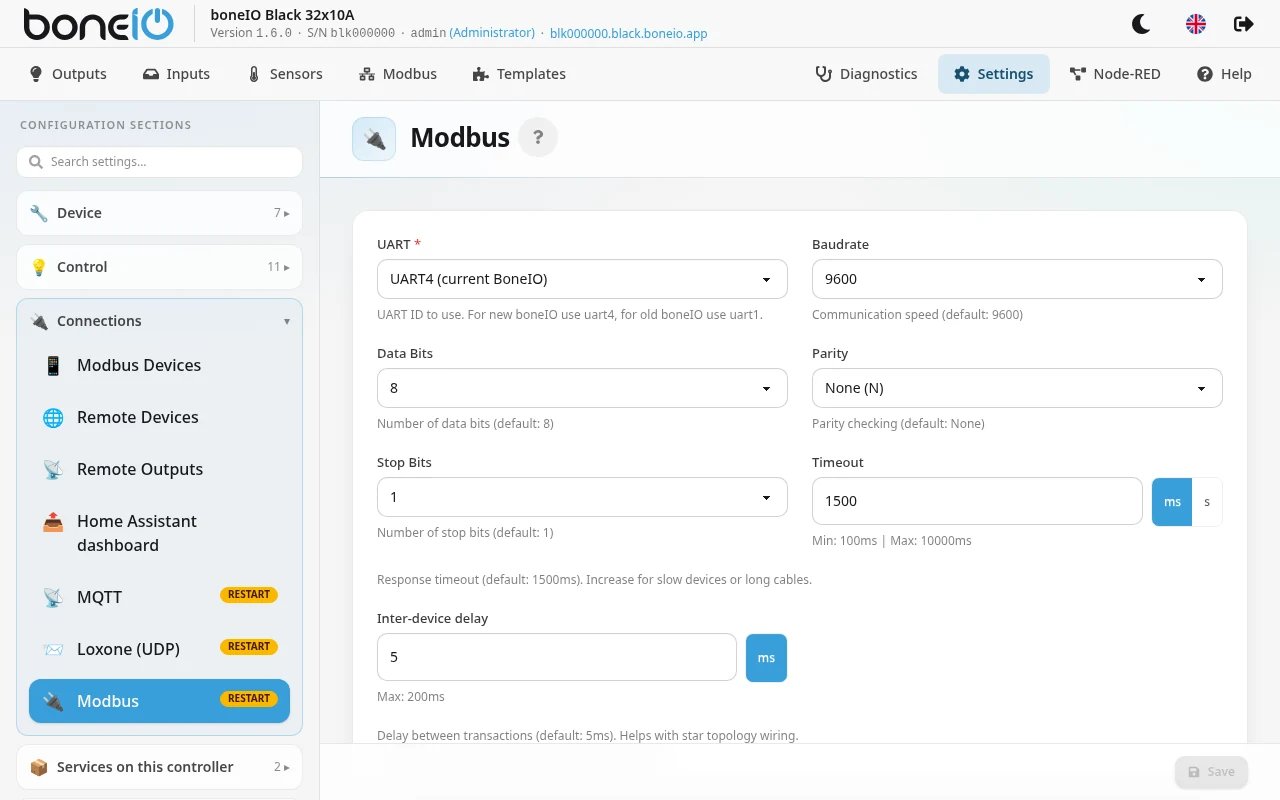
| Field | What it does |
|---|---|
| UART | The serial port the bus is on. UART4 (current BoneIO) on every controller from version 0.4, including 1.0 and 1.1. UART1 (old BoneIO) only on 0.2 and 0.3. Required. |
| Baudrate | Bus speed, from 1200 to 115200. Default 9600. |
| Data Bits | 7 or 8. Default 8. |
| Parity | None (N), Even (E) or Odd (O). Default None. |
| Stop Bits | 1 or 2. Default 1. |
| Timeout | How long to wait for a device to answer. Default 1500 ms; the panel accepts 100 ms to 10 s. Increase it for slow devices or long cables. |
| Inter-device delay | Pause between two Modbus transactions. Default 5 ms; the panel accepts 0 to 200 ms. |
All devices on the bus must use the same speed, data bits, parity and stop bits. A device set differently will not answer.
Inter-device delay and wiring
If the devices are wired one after another (daisy-chain, the recommended RS485 layout), 0 ms is enough.
If several cables run from the controller in a star, signal reflections need time to settle. Set 5–50 ms.