Remote Outputs
Use a relay or light of another device — ESPHome, WLED, another boneIO — as an output of this controller.
A remote output is a relay, light or cover of another device that this controller uses as if it were its own. It shows up on the Outputs page, can be switched by buttons and schedules, and can be used in irrigation zones, output groups and templates.
The other device must first be added under Remote Devices.
To switch a remote output from a single button you do not need a remote output at all — the Control Remote Output action does that directly, see Actions. A remote output is worth adding when the device should behave like a local output: with a timer, an interlock, a place in a group or in irrigation.
Adding a remote output
- Open Settings → Connections → Remote Outputs
- Click Add New
- Fill in the two tabs and save
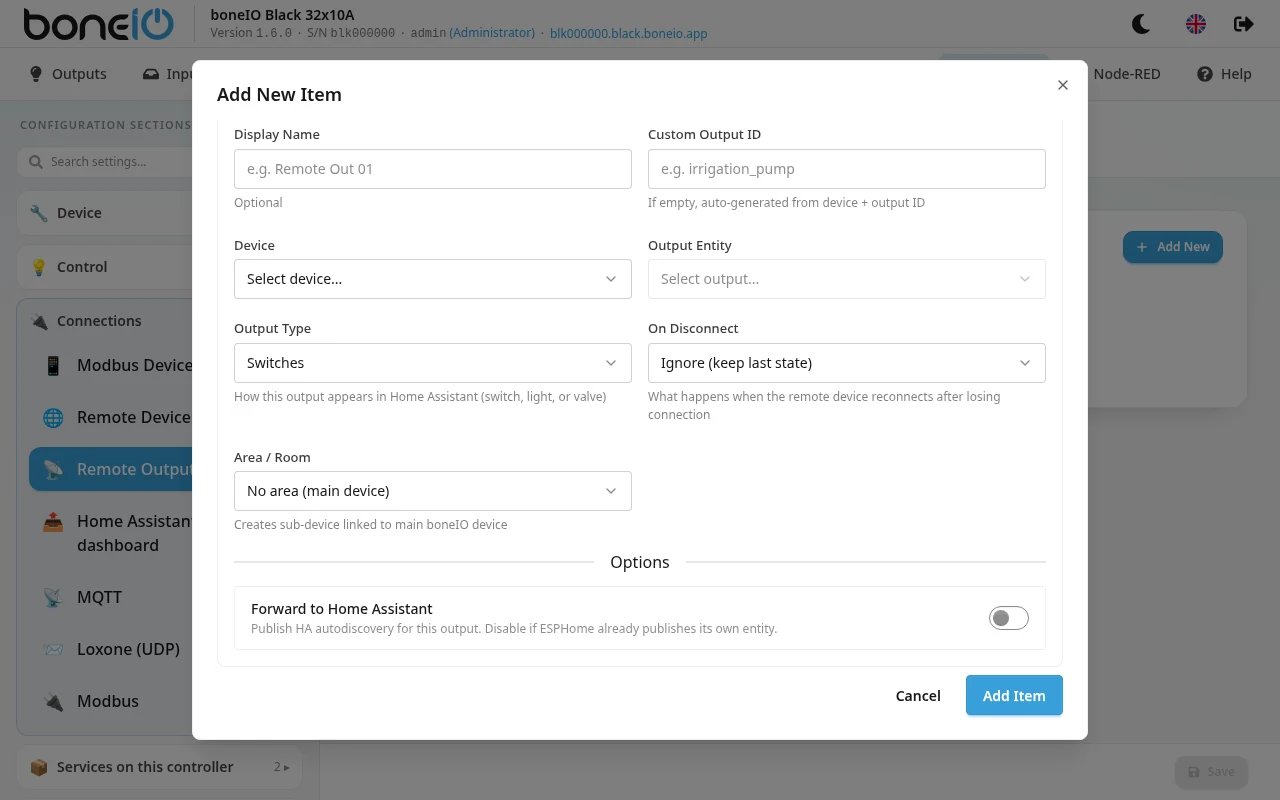
Basic Settings
| Field | What it does |
|---|---|
| Device | The remote device. Only devices with outputs are listed. The panel sets the protocol from it. |
| Output Entity | The switch, light or cover on that device. For WLED: Main (whole device) or one segment. |
| Display Name | Name shown in the panel and Home Assistant. Optional. |
| Custom Output ID | Optional. If left empty, the ID is made from the device and the output, e.g. garden_esp_relay_1. |
| Output Type | Switches, Lights, Valves or Covers. A light that supports brightness can only be a light. |
| On Disconnect | What happens when the device drops off the network — see below. |
| Area / Room | Area in Home Assistant. |
| Forward to Home Assistant | Off by default. Leave it off if the device already shows up in Home Assistant by itself, or you get the same thing twice. |
On Disconnect:
- Ignore (keep last state) — the default. The output keeps showing its last known state.
- Force OFF (safe for pumps) — the output is shown as off at once, and when the device comes back the controller sends it an OFF command. Choose this for pumps and irrigation, where "stays on while nobody can see it" is the worst case.
Advanced Settings
| Field | What it does |
|---|---|
| Momentary Turn On | Switches off by itself this long after switching on. |
| Momentary Turn Off | Switches on by itself this long after switching off. |
| Adjustable Duration | A slider in Home Assistant that sets how long the output stays on — with Default Duration, Minimum Duration, Maximum Duration and HA Slider Unit, as for local outputs. |
| Interlock Group | Shared with local outputs: a remote output and a local output in the same group cannot be on at the same time. |
| Enforce Interlock | Off by default. |
The interlock only guards what goes through boneIO. If the output is switched on directly — in ESPHome, or through its own entity in Home Assistant — boneIO is not asked. With Enforce Interlock on, boneIO notices such a change and, if it breaks the interlock, switches the output off again at once.