MCP23017 expander
I2C addresses and relay logic of the MCP23017 expanders that drive the outputs.
The relays of a boneIO Black controller are driven by MCP23017 chips (expanders) on the I2C bus. Each chip has an address, and the controller has to know it, or the outputs on that chip do nothing. Most owners never open this section: the addresses and the relay logic come from the controller type and version set in boneIO. Change them only if your controller uses different addresses, for example an older controller after an update or a replaced relay board.
Where it is
Open Settings → Advanced → MCP23017 (Advanced). The entry carries the restart badge.
Changing the addresses
- Check which addresses actually respond: Diagnostics → Buses → I2C scans the bus. Nothing is saved there.
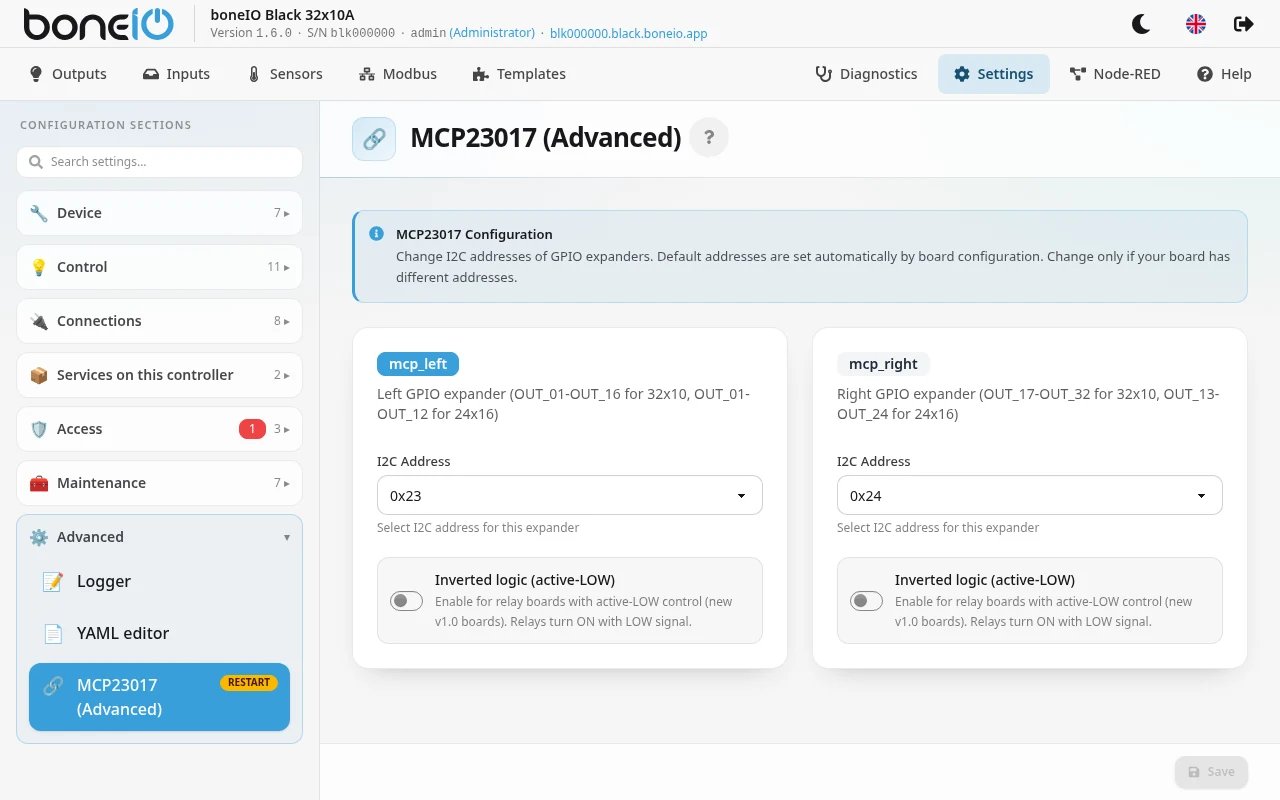
- Open Settings → Advanced → MCP23017 (Advanced). There is one card for mcp_left and one for mcp_right.
- Pick the I2C Address of each expander and set Inverted logic (active-LOW) if needed.
- Click Save. The panel shows App restart required. Click Restart Now, or nothing changes.
| Field | What it does |
|---|---|
| I2C Address | The address of this expander, 0x20 to 0x27. mcp_left drives OUT_01–OUT_16 on 32x10 (OUT_01–OUT_12 on 24x16), mcp_right OUT_17–OUT_32 on 32x10 (OUT_13–OUT_24 on 24x16). |
| Inverted logic (active-LOW) | The relays switch on with a LOW signal. On for controllers from version 1.0, off for older ones. If it is not set at all, the controller detects it at startup and remembers it; the card then says what it detected. The Active-LOW badge appears while inverted logic is in use. |
Defaults, for comparison: controllers from version 0.8 use 0x23 for mcp_left and 0x24 for mcp_right (48x4: 0x23, 0x24, 0x25). Older controllers mostly use them the other way round from what you might expect: 0x21 for mcp_left and 0x20 for mcp_right. Picking them in the wrong order swaps OUT_01–OUT_16 with OUT_17–OUT_32, so check against the I2C scan and switch an output to see which relay clicks.
A wrong address means the outputs on that expander stop working. The controller lists the failure in Settings → Maintenance → Hardware errors. Wrong Inverted logic turns the relays the other way round: off shows as on, and every relay may switch on at once.
48x4 controllers: do not save this section in the panel. They have a third expander, mcp_middle, which the form does not show.
Saving keeps only mcp_left and mcp_right, so the outputs on mcp_middle stop working. Edit the addresses in Settings → Advanced → YAML editor instead (YAML below).
The same applies to any extra MCP23017 you added in YAML yourself.
Once saved, the addresses stay in the configuration as you set them: changing the controller type or version in boneIO no longer changes them.
To go back to the defaults, delete the whole mcp23017: section in Settings → Advanced → YAML editor and restart.