Output module
Outputs implemented using relays built into the controller. Depending on the settings, they can take several forms and have different properties.
Web application configuration
Recommended configuration method.
Sample webui configuration
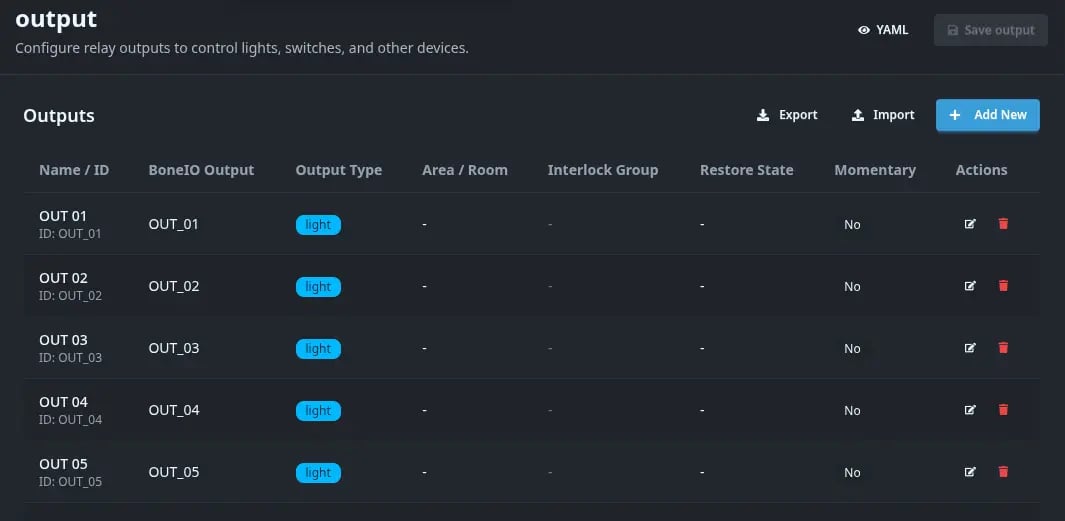
A view allowing for the preview of defined outputs, output types, assigned areas, interlock groups, state restoration, and "Momentary" verification. From this level, you can also add new outputs and delete unused ones. Additionally, it allows for their export and import.
Basic Settings
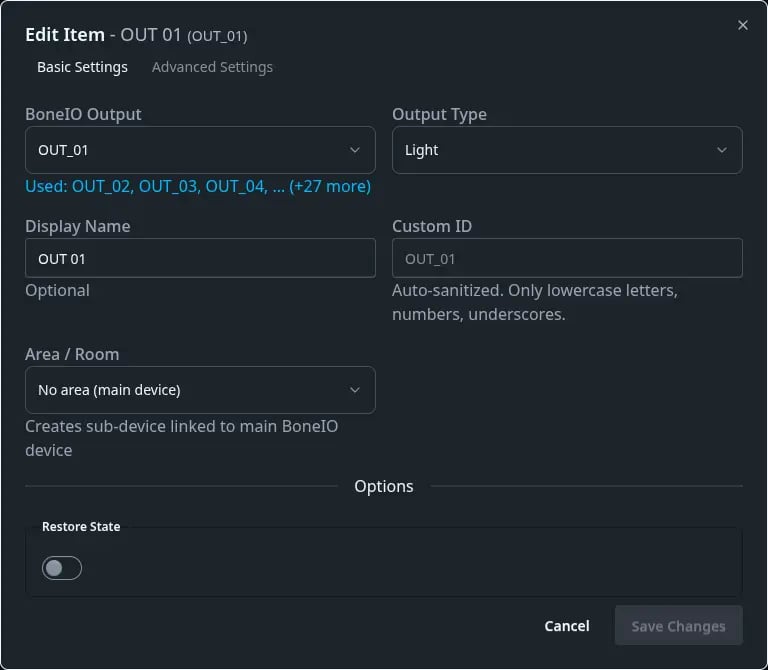
| Option name | Description |
|---|---|
| boneIO Output | Field allowing for the selection of the output to be edited if one is available. |
| Output type | Definition of the output type: available types are: Light, Cover, Switch, Valve, and None. |
| Display Name | The name with which the output will be displayed in the controller's webui, MQTT, and HA. |
| Custom ID | Ability to define a custom ID for the output. |
| Area/Room | Selection of the appropriate area. |
| State restoration | Checking this option causes the controller to restore the relay to its previous state after a restart. |
Advanced Settings
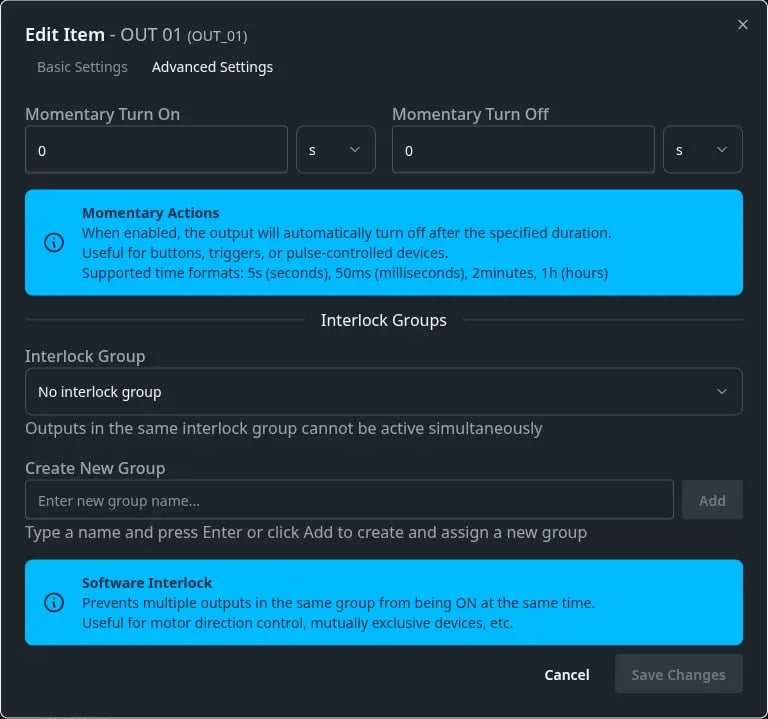
| Option name | Description |
|---|---|
| Momentary on | Allows for activating the output only for a specific amount of time. |
| Momentary off | Allows for deactivating the output for a specific amount of time. |
| Interlock group | Allows for adding a given output to a so-called interlock group - this means that at any given moment, only one output from the assigned group can be active (useful for covers/shutters and irrigation systems). |
Yaml Editor
Example config
output:
  - boneio_output: OUT_01
    name: Kitchen Light
output_type: lightoutput:
- id: kitchen_main
boneio_output: OUT_01
name: Kitchen Light
output_type: lightLegacy: Direct hardware configuration
output:
  - id: kitchenlight
    name: Kitchen Light
    kind: mcp
    mcp_id: mcp2
    pin: 15
    output_type: light
restore_state: Trueoutput:
- id: kitchenlight
name: Kitchen LED Strip
kind: pca
pca_id: pca1
pin: 15
output_type: led
restore_state: True
percentage_default_brightness: 1You can mix outputs in one configuration file, or you can split them to more than one file - check configuration how to load yaml files.
Configuration variables:
- id (Optional, string) - Technical identifier used in MQTT topics, output groups, and actions.
- If
boneio_outputis set:idis optional (defaults toboneio_outputvalue) - If
boneio_outputis NOT set:idis REQUIRED - If both are set:
idoverridesboneio_outputas identifier
- If
- name (Optional, string) - Display name shown in Home Assistant. If not set, uses the effective ID.
- boneio_output (Optional, string) - Reference to predefined output configuration (e.g., OUT_01, OUT_02). Available only when
boneio:section is configured. Used as default ID ifidfield is not specified. - area (Optional, string) - Reference to area ID defined in
areassection. Creates a sub-device linked to the main BoneIO device. - kind (Optional, string, allowed_values:
['gpio', 'mcp', 'pca', 'pcf']) - What kind of output it is. For relay board always usemcp. Not needed when usingboneio_output. - pin (Optional, integer) - PIN id of MCP, GPIO, PCA, or PCF. For MCP it's value 0-15. Not needed when using
boneio_output. - mcp_id (Optional, string) - MCP ID reference. Not needed when using
boneio_output. - pca_id (Optional, string) - PCA ID reference. Not needed when using
boneio_output. - pcf_id (Optional, string) - PCF ID reference. Not needed when using
boneio_output. - output_type (Required, string, allowed_values:
['switch', 'light', 'none']) - What type of output it is. Switch/light shows as such device in Home Assistant. Value none means that this output is not published to MQTT. It's internal use only for other component eg cover. - momentary_turn_on (Optional, timeperiod) - Time period after relay will be turned off. Examples 50ms, 500ms, 5s, 20mins, 2hours
- momentary_turn_off (Optional, timeperiod) - Time period after relay will be turned on. Examples 50ms, 500ms, 5s, 20mins, 2hours
- restore_state (Optional, boolean, default: True) - You can enable restore_state option. It saves state of relay or cover in
state.jsonfile, which is located in same directory as yourconfig.json. Ifoutput_typeis None, then this value is overwritten to False!
PCA9685 only:
- percentage_default_brightness (Required, integer, default: 1) - This option allow for pca make default brightness value when you just turn on the output from for example home assistant app. When you set brightness by chose value in home assistant it will set brightens that what you pick by app.