Modbus devices
Section where we manage devices connected to the Modbus bus.
Web application configuration
Recommended configuration method.
Sample webui configuration
 A view allowing for the preview of defined Modbus devices, their addresses, update intervals, and assigned areas.
Adding new
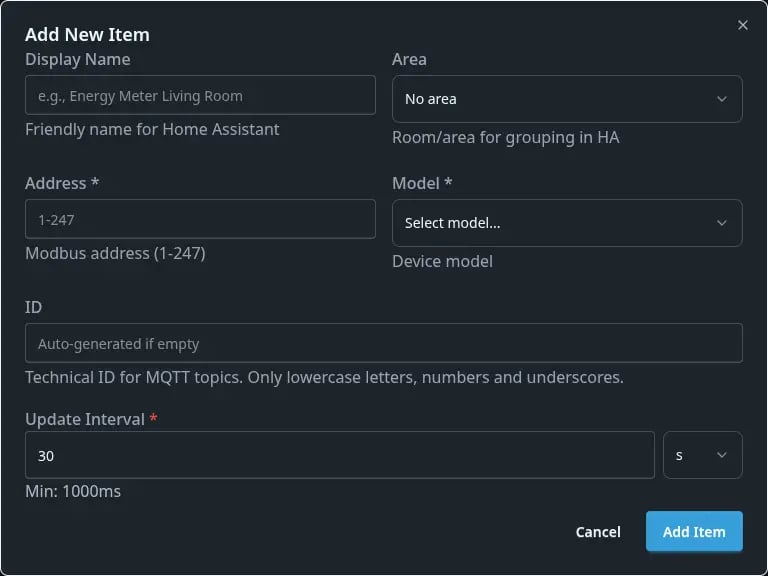
| Option name | Description |
|---|---|
| Display name | The name with which the device will be visible in the application, MQTT, and HA. |
| Area | selection of the appropriate area. |
| Address | Address of the added Modbus device. |
| Model | Allows selecting a specific device from a defined list. |
| ID | Technical device ID for MQTT topics. |
| Update interval | Allows changing the interval at which device states are updated. |
YAML Editor
Required modules
modbusModbus sensors component. You need to know address of device you want to connect to! Supported devices:
| Device | Model name |
|---|---|
| Eastron SDM6301 Energy meter | sdm630 |
| Eastron SDM1201 Energy meter | sdm120 |
| Sofar Solar PV Inverter | sofar |
| Socomec E23 Energy Meter 3-Phase | socomec_e23 |
| Socomec E03 Energy Meter 1-Phase | socomec_e03 |
| r4dcb08 Temperature Dallas Board | r4dcb08 |
| CWT-TH0x Temperature and Humidity sensor | cwt |
| SHT20 Temperature and Humidity sensor | sht20 |
| SHT30 Temperature and Humidity sensor | sht30 |
| Liquid depth sensor | liquid-sensor |
| Orno-or-we-517 Energy Meter | orno-or-we-517 |
| Ventclear ventilation system | ventclear |
| Fujitsu Air Conditioner | fujitsu |
| Thessla Green AirPack 4 ventilation system | thesslea |
Example config
modbus:
  uart: uart4

modbus_devices:
  - id: sofar1
    model: sofar
    address: 1
  - id: sdm1
    model: sdm630
    address: 32
  - id: Liquid sensor
    model: liquid-sensor
    address: 41
  - id: CWT TH0x
    model: cwt
    address: 61
  - id: SHT20
    model: sht20
    address: 62
    sensors_filters:
      temperature:
        - offset: -2
        - round: 2
      humidity:
        - round: 3
Configuration variables:
- id (Required, string) - uniquely identifies this device in MQTT and Home Assistant
- address (Required, string) - modbus address of the device you want to communicate with.
- model (Required, string) - model schema to use. Check table above to get model name.
- update_interval (Optional, timeperiod, default: 60 seconds) - update interval. Modbus connection is pretty cpu intensive so customize with care. Minimum is 1 second, but recommended minimum is 10 secs.
- sensors_filters (Optional, dictionary) - dictionary of
sensor_name: list of filters. See example above how to use those. Currently possible filters are for temperature and humidity. For filter list see Filters. Sensor filters are working for temperature and humidity values only for now.
Footnotes
-
Those energy metters can be found in two versions and only one supports Modbus - sometimes it's marked with suffix
M(SDM120M/SDM6301M), other timeModbusis mentioned in the title. Don't confuse it with cheaper version with suffixD(SDM120D/SDM6301D) - it doesn't support Modbus communication so it can't be connected with Bone.io. ↩ ↩2