Onewire Sensors
Section where we manage devices connected to the Onewire bus.
Web application configuration
Recommended configuration method.
Sample webui configuration
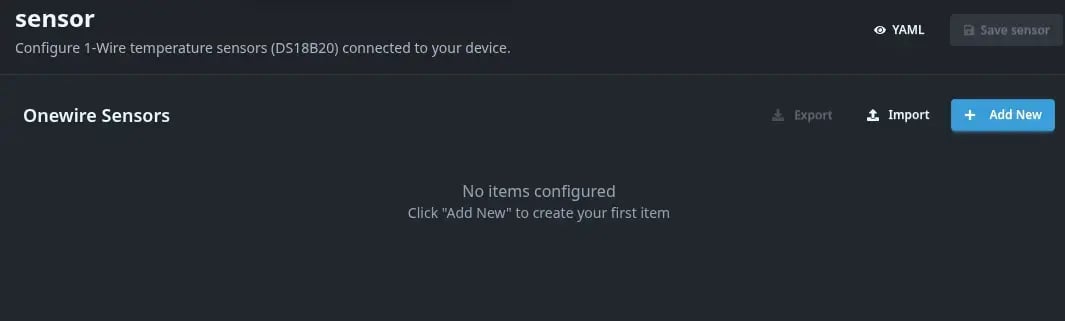 View allowing for the preview of defined Onewire devices, their addresses, and update intervals.
Adding new
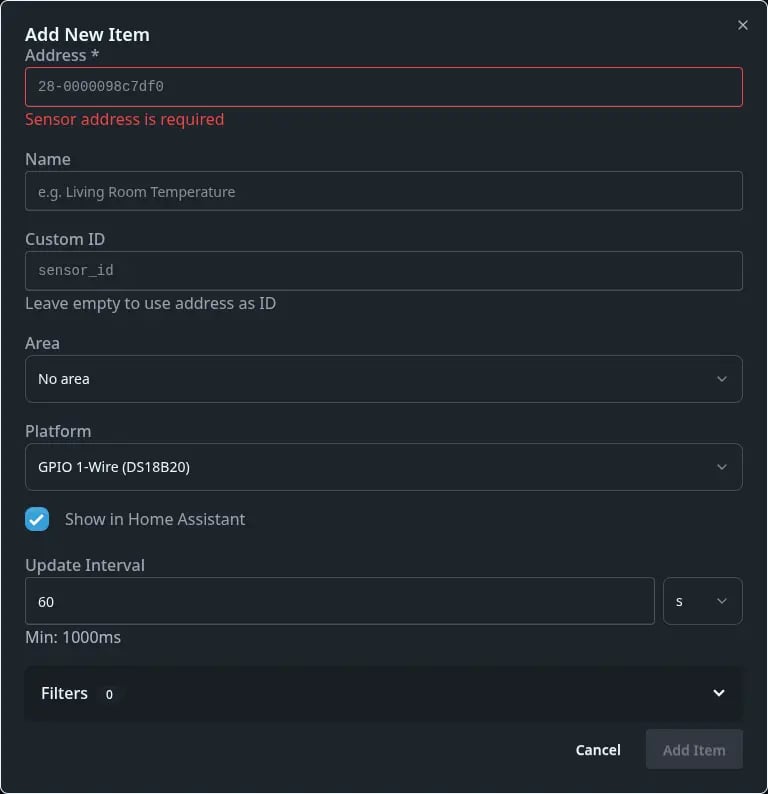
| Option Name | Description |
|---|---|
| Detected sensors | Onewire sensor address - The controller automatically detects devices connected to the bus - The device address will be filled in automatically. |
| Name | The name with which the Onewire sensor will be displayed. |
| Custom ID | Allows entering a user-defined device ID. Defaults to the sensor address. |
| Area | Selection of the appropriate area. |
| Platform | Selection of the sensor type. |
| Show in Home Assistant | Allows hiding the sensor in Home Assistant. |
| Update interval | The interval at which boneIO updates the sensor status. |
| Filters | Allows filtering the values indicated by the sensor. A set of necessary filters is available. |
YAML Editor
The DS18B20 is a 1-wire temperature sensor. You can use a DS2482 to connect a Dallas sensor or a OneWire GPIO pin (P9.12 only!). To configure OneWire GPIO, follow the instructions below. If you have a DS2482, configure the DS2482 section first, then configure the sensor list.
Configure P9.12 One Wire
Log in to your Beaglebone via SSH.
Edit the /boot/uEnv.txt file using a file editor (you must use sudo, e.g., sudo nano /boot/uEnv.txt).
Uncomment (remove the # from the beginning) the following line:
uboot_overlay_addr4=/lib/firmware/BB-W1-P9.12-00A0.dtboReboot the device.
Sample configuration
dallas:
  id: mydallas

sensor:
  - platform: dallas
    id: temperature
    address: 0x6e0300a279d76428
    bus_id: mydallas
    update_interval: 60s
    filters:
      - round: 2
      - offset: 5
Configuration variables:
- platform (Required, string, default: dallas) - currently only Dallas is supported in the platform variable. Define this to avoid issues in future versions.
- id (Optional, string, default: I2C device address) - uniquely identifies this device in MQTT and Home Assistant.
- address (Required, int) - The address of the Dallas device.
- bus_id (Optional, string) - The ID of the DS2482 defined in the ds2482 section or the dallas ID. Defaults to the Dallas bus ID.
- show_in_ha (Optional, boolean, default: True) - Send an autodiscovery message to Home Assistant.
- update_interval (Optional, timeperiod, default: 60 seconds) - how often this sensor should update.
- unit_of_measurement (Optional, string, default:
°C) - sensor unit of measurement. This does not perform any mathematical calculations to switch between units! - filters (Optional, list, default:
- round: 2) - list of filters. See Filters to learn more.