Electrical Cabinet and Network Rack
How to choose the right size for a Smart Home electrical cabinet? Learn about key components and cabinet organization principles.
In a modern Smart Home installation, the line between "electrical" and "IT" blurs. The electrical cabinet stops being just a fuse box and becomes a command center that must work closely with the network rack.
1. Electrical Cabinet (The Heart of boneIO)
This is where all 230V cables, sensor wires, reed switches, and buses converge – this is where we mount the automation (boneIO controllers).
How to Choose Cabinet Size?
Choosing the cabinet size is the most common mistake during construction. A Smart Home installation based on star topology and controllers requires significantly more space than a traditional electrical cabinet.
Choosing a cabinet "by eye" always ends with lack of space. You need to perform a simple module calculation (1 module = 17.5 mm):
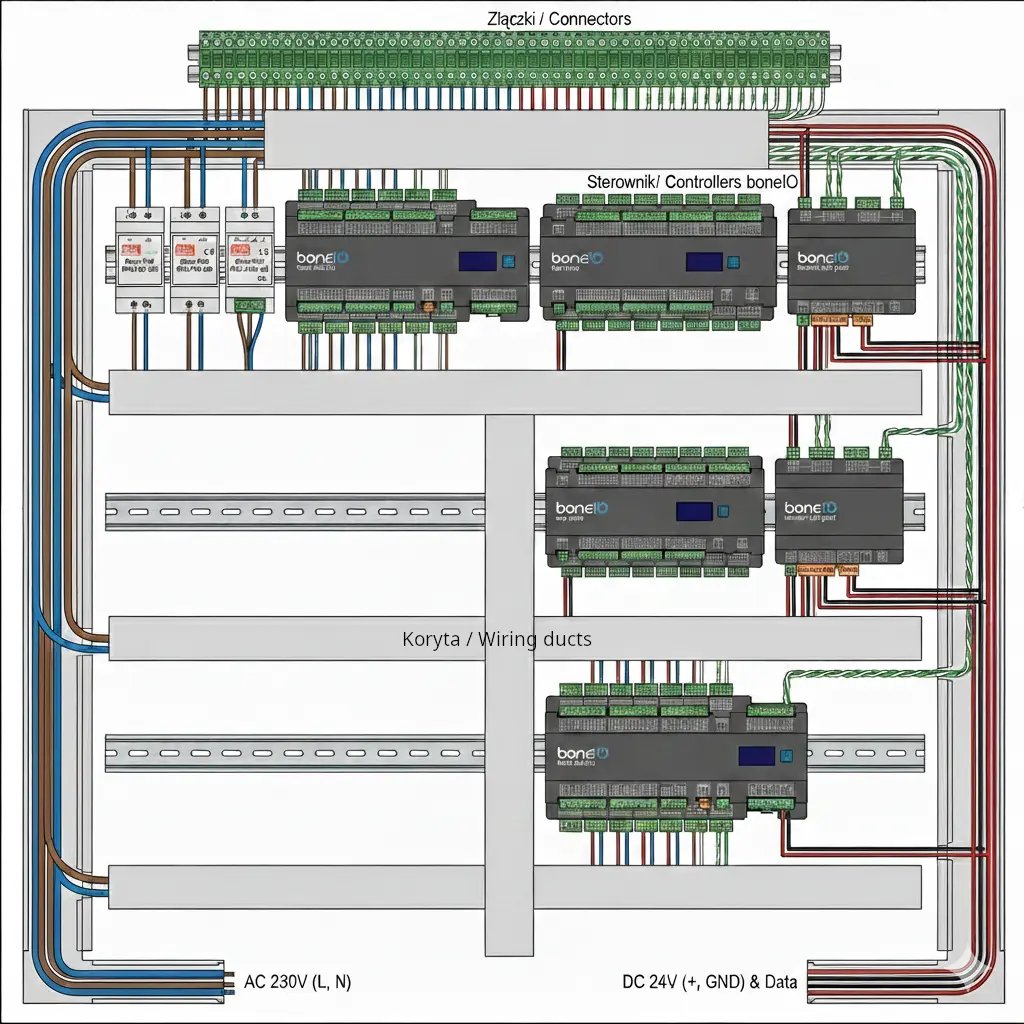
- Count boneIO controllers:
- boneIO 32x10A, 24x16A, Cover, CoverMix: takes 12-15 modules on DIN rail.
- boneIO ESP 8x10A, Input24 Gen2 takes 7 modules.
- boneIO ESP Dimmer LED: takes 7 modules.
- Power Supplies and Switch: DIN rail power supplies (e.g., Mean Well) take 2 to 4 modules. The automation switch should also be here to shorten the twisted pair runs from controllers.
- Terminal Blocks: They can consume a lot of space. Assume that one DIN rail row will be entirely dedicated to terminal blocks for incoming cables. To avoid chaos, all cables coming from the house (both 230V and twisted pairs) should first go to terminal blocks at the top or bottom of the cabinet. Only from there do we run short connections to controllers and circuit breakers. This ensures aesthetics and easy maintenance.
- We also can't forget about "twisted pairs" from buttons and sensors. They should also go to an "intermediate point" in the form of popular LSA connectors or so-called reverse patch panels.
For an average house of 120-150 m² with full Smart Home, a cabinet with 144-192 modules is the absolute minimum to maintain order and proper ventilation.
- Reserve Rule: Never choose a cabinet "just right". Assume that after mounting everything you plan, at least 20-30% of slots should remain free. Smart systems tend to expand (additional energy meters, extra power supplies).
Automation Switch (Inside the Cabinet)
We mount a dedicated DIN rail switch in the electrical cabinet.
- Why here? All boneIO controllers connect with short patch cables to this switch within one cabinet.
- Autonomy: Even if the main router in the network rack fails, boneIO controllers still see each other within this switch, allowing direct bindings to work (e.g., button -> light).
For DHCP connections, set the DHCP server to assign addresses for several hours, so that even a longer router failure won't cause the device to lose its IP address, or use static addressing.
Key Components
Every Smart Home electrical cabinet should contain:
| Group | Elements |
|---|---|
| Standard Equipment | Main switch, Phase indicator, Surge protector, RCD and overcurrent circuit breakers. |
| Smart Section | boneIO controllers (32x10A, CoverMix, Dimmers), 12V/24V DC power supplies. |
| Energy Metering | Main energy meter and dedicated meters (e.g., for heat pump). |
| Organizational | Distribution blocks, cable ducts, terminal blocks. |
2. Network Rack (IT Infrastructure)
The stability of the boneIO system depends on your LAN network. Don't rely on the free router from your internet provider – Smart Home requires a more solid foundation.
The Heart of the Network: Router
A router is not just internet access, it's the "supervisor" directing traffic in your home. What should it feature?
- VLAN Support: Must be able to isolate Smart Home devices from your laptops or TVs (security).
- Stable VPN Server: So you can securely connect to your home (Home Assistant) from outside without exposing ports to the world.
- Performance: Stable operation with a large number of permanent local connections (boneIO, cameras, sensors).
- Recommendations: Solutions like MikroTik, Ubiquiti UniFi, or servers based on OPNsense/pfSense.
Network and Switches
- Automation Switch: A dedicated switch in the control cabinet (described in the electrical cabinet section), to which only boneIO controllers are connected. This makes communication between them (e.g., via ESPHome protocol) autonomous and independent of the rest of the home network.
- Main Switch (Managed): The heart of the network connecting the server, LAN outlets, and APs. It's worth having PoE ports (for powering access points). Thanks to PoE, you won't need to run power adapters to every device – just a twisted pair cable.
- Monitoring Switch (PoE): A separate switch for cameras so their high network traffic doesn't burden the main backbone.
- Patch Panel: We can't forget about it - it's where all twisted pairs from rooms terminate, camera connections arrive, or the dedicated cable connecting the electrical cabinet to the network rack. It allows for aesthetic "connection" of outlets to the switch.
Home Assistant Server
This is where most logical decisions for your home are made.
- Hardware: Mini PC (e.g., Dell Wyse, HP ProDesk, Computer with N100 processor) with x64 processor and SSD drive. This is a much more durable and faster solution than Raspberry Pi with an SD card, which can fail after a few months of intensive writes. An additional advantage is their high energy efficiency, which is crucial for 24/7 operation in a home environment.
If Home Assistant is to support modern features like Voice Assistant and image recognition, consider investing in more modern, faster hardware (or a separate server for image recognition).
3. Backup Power (UPS)
Control electronics and servers don't handle sudden power outages well.
- What to connect to UPS? The absolute minimum is the network rack (router, switch, HA server).
- boneIO on UPS: boneIO controllers are extremely energy-efficient. It's worth powering them from a UPS so the system "sees" events (e.g., flood sensors or window openings) even during power grid failure. This also guarantees that the "brain" of the house won't shut down during a brief power flicker.
- Integration (NUT): We recommend choosing a UPS compatible with Network UPS Tools (NUT). This way, the router and Home Assistant will receive information about power failure and can, for example, safely shut down the system or send you a notification on your phone.
REMEMBER: The network rack runs at higher temperatures. Ensure proper ventilation (passive or forced) to extend the life of the server and power supplies.