Hardware Installation
Detailed instructions and connection diagrams for the boneIO Edge Temperature & Humidity sensor, including power supply and communication buses.
Key Safety Principals
IMPORTANT: PROFESSIONAL INSTALLATION REQUIRED
We emphasize in the strongest possible terms: safety is the absolute priority. All activities related to connecting the device to an electrical installation must be performed exclusively by a qualified electrician who holds the appropriate certifications. Installation by unqualified individuals poses a risk of electric shock, equipment damage, or fire. The manufacturer assumes no liability for damages resulting from an improper installation.
This applies in particular to:
- Connecting the power supply to the controller.
- All installation work inside the electrical cabinet (distribution board).
Attempting to modify an electrical installation without the proper qualifications is illegal, extremely dangerous, and creates a real hazard that can lead to:
- Electric shock, severe personal injury, or death.
- Permanent damage to the boneIO controller and all connected equipment.
- A significant fire hazard resulting in property damage.
- Voiding the product warranty and potential issues with property insurance claims.
The manufacturer of boneIO assumes no liability whatsoever for material damages, personal injury, or loss of life resulting from an installation performed contrary to these guidelines and applicable safety standards.
Please treat this warning with the utmost seriousness.
Device Installation
boneIO Edge Temperature & Humidity is an extremely compact device. Thanks to its compact, longitudinal design, it allows for installation in almost every corner of the house. We recommend securing the device with hot glue (NOTE: this must be done carefully to avoid damaging the device) or mounting tape.
IMPORTANT: CONFIGURE BEFORE INSTALLATION!!!
Although this part of the documentation is dedicated to the hardware, we emphasize that before installing the device, you should configure it! Every sensor is delivered with the same address! This means it must be changed in each device one by one.
Connection
boneIO Edge Temperature & Humidity is a device that we connect to a serial Modbus RTU bus. Our sensor is equipped with a single cable connector. Thanks to it, the installation process is extremely simple. We recommend using secure and durable connections such as solder joints. You should also remember to properly insulate the wires, e.g., with "heat shrinks".
- Disconnect the plug from the device! - Extremely important to avoid damaging the device during the installation process!
- Disconnect the Modbus RTU bus from the controller! - No work should be performed on a connected bus!
- Disconnect the power from the bus - No work should be performed with the power connected!
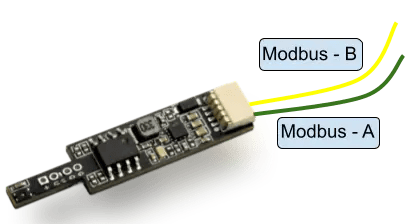
- Connect the sensor wires to the Modbus bus.
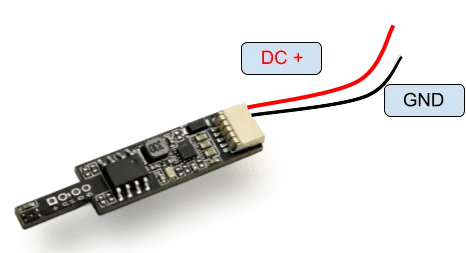
- Connect the wires responsible for the power supply.
- Connect the plug to the sensor, connect the bus, and turn on the power.
Wiring is led out from the male plug and should be connected in the following way:
| Wire Color | Task |
|---|---|
| 🟥 Red | Supply voltage |
| ⬛ Black | Device ground |
| 🟩 Green | Modbus - A |
| 🟨 Yellow | Modbus - B |
Final Check
- Carefully check the wire connections.
- Ensure there are no short circuits.
- Turn on the power to the device.
Overview and Specification
Precise temperature and humidity sensor. Enables your home automation system to control heating, ventilation, and ON/OFF devices based on real conditions.
Connecting the sensor in the Black ecosystem
Step-by-step guide on how to find, change the address, and configure the sensor.