Hardware Installation
Detailed instructions and wiring diagrams for the boneIO Black Cover controller, including power, inputs, outputs, and communication buses.
Key Safety Principals
IMPORTANT: PROFESSIONAL INSTALLATION REQUIRED
We emphasize in the strongest possible terms: safety is the absolute priority. All activities related to connecting the device to an electrical installation must be performed exclusively by a qualified electrician who holds the appropriate certifications. Installation by unqualified individuals poses a risk of electric shock, equipment damage, or fire. The manufacturer assumes no liability for damages resulting from an improper installation.
This applies in particular to:
- Connecting the power supply to the controller.
- Connecting high-voltage circuits (110V/230V) to the controller's outputs.
- All installation work inside the electrical cabinet (distribution board).
Attempting to modify an electrical installation without the proper qualifications is illegal, extremely dangerous, and creates a real hazard that can lead to:
- Electric shock, severe personal injury, or death.
- Permanent damage to the boneIO controller and all connected equipment.
- A significant fire hazard resulting in property damage.
- Voiding the product warranty and potential issues with property insurance claims.
The manufacturer of boneIO assumes no liability whatsoever for material damages, personal injury, or loss of life resulting from an installation performed contrary to these guidelines and applicable safety standards.
Please treat this warning with the utmost seriousness.
DIN Rail Mounting
The boneIO ESP controller is designed for mounting on a standard DIN rail (TS35).
- Hook the upper clips of the enclosure onto the top edge of the DIN rail.
- Press the lower part of the enclosure firmly until the latches lock onto the rail with a distinct click.
- Ensure the module is securely mounted.
Power Supply Connection
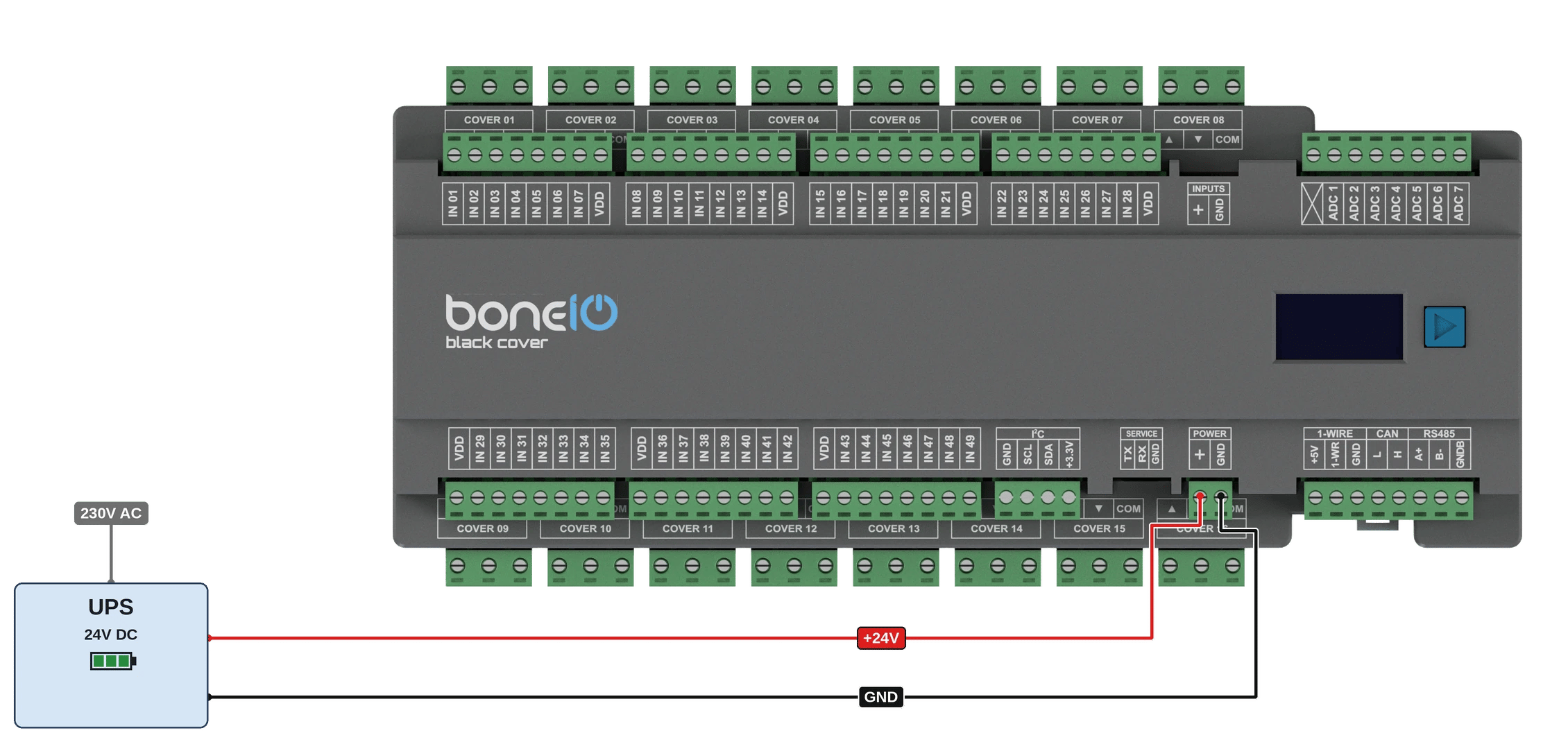
The device requires a stabilized 24V DC power supply.
- Ensure the power supply is disconnected from the 230V/110V mains.
- Connect the
+24Voutput of the power supply to the+screw terminal on the boneIO. - Connect the
GND(ground) output of the power supply to theGNDscrew terminal on the boneIO. - Double-check the connections and polarity before turning on the power supply.
Backup power (UPS) — recommended
Power boneIO Black from a 24 V DC supply with battery backup — a UPS or a buffered (DC-UPS) power supply. boneIO Black should see uninterrupted 24 V, even when the mains drops for a moment.
boneIO Black is a small Linux computer. It writes its configuration, logs and — during an update — system packages to its memory card or eMMC, and it has no battery-backed clock. Most of its unexpected restarts are caused by short brownouts on the mains. A few minutes on a battery covers them.
What a UPS gives you:
- No restart on a mains blip. Outputs, inputs and automations keep working through short cuts and voltage dips.
- The right time. After a power cut the controller does not know the time until its network is up and a time server answers. Until then schedules, sun events and time windows in conditions wait.
- Safe updates. A system update can take up to an hour on a controller that has not been updated for a long time. The display and the panel say Do not power off — a power cut in the middle of it is the one case that may need hands on the device to repair.
The choice of the unit is yours or your installer's. Two common setups:
- a DIN-rail 24 V DC-UPS module (or a power supply with a buffer and battery) in the cabinet, between the power supply and boneIO Black,
- a 230 V UPS feeding the 24 V power supply.
Either way the wiring to boneIO Black is the one in the picture above: +24V to + and GND to GND on the POWER terminal, coming from the UPS side.
Size it for everything on the same 24 V line, not just boneIO Black — relay coils, sensors and other devices powered from it count too.
boneIO Black copes better with a power cut since 1.6: it checks and repairs its file system at start, a damaged boot partition no longer stops it, and an interrupted package install is finished on the next boot. A UPS is still the recommendation — the controller does not shut itself down when the battery runs out, so the UPS is what keeps it running.
SERVICE port
From version 1.0, boneIO Black controllers have a SERVICE terminal with three pins: TX, RX and GND. It is the controller's serial console (UART) — a terminal into its Linux system, used for diagnostics and repair when the network or the panel does not answer.
Do not connect anything to it permanently. It is for servicing only. There is no +3.3V pin: the port does not power the adapter you connect.
Connect Ethernet
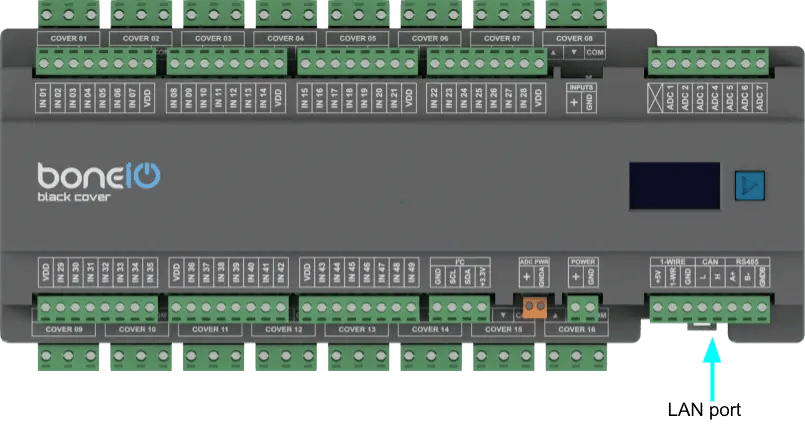
The device communicates with the network using a built-in Ethernet port, which guarantees a stable and reliable connection. To establish connectivity, connect the module to your network switch using a standard Ethernet (RJ45) cable.
- Connect ethernet cable to LAN port on your controller.
- Connect other side of ethernet cable to your network switch.
Connecting Digital Inputs
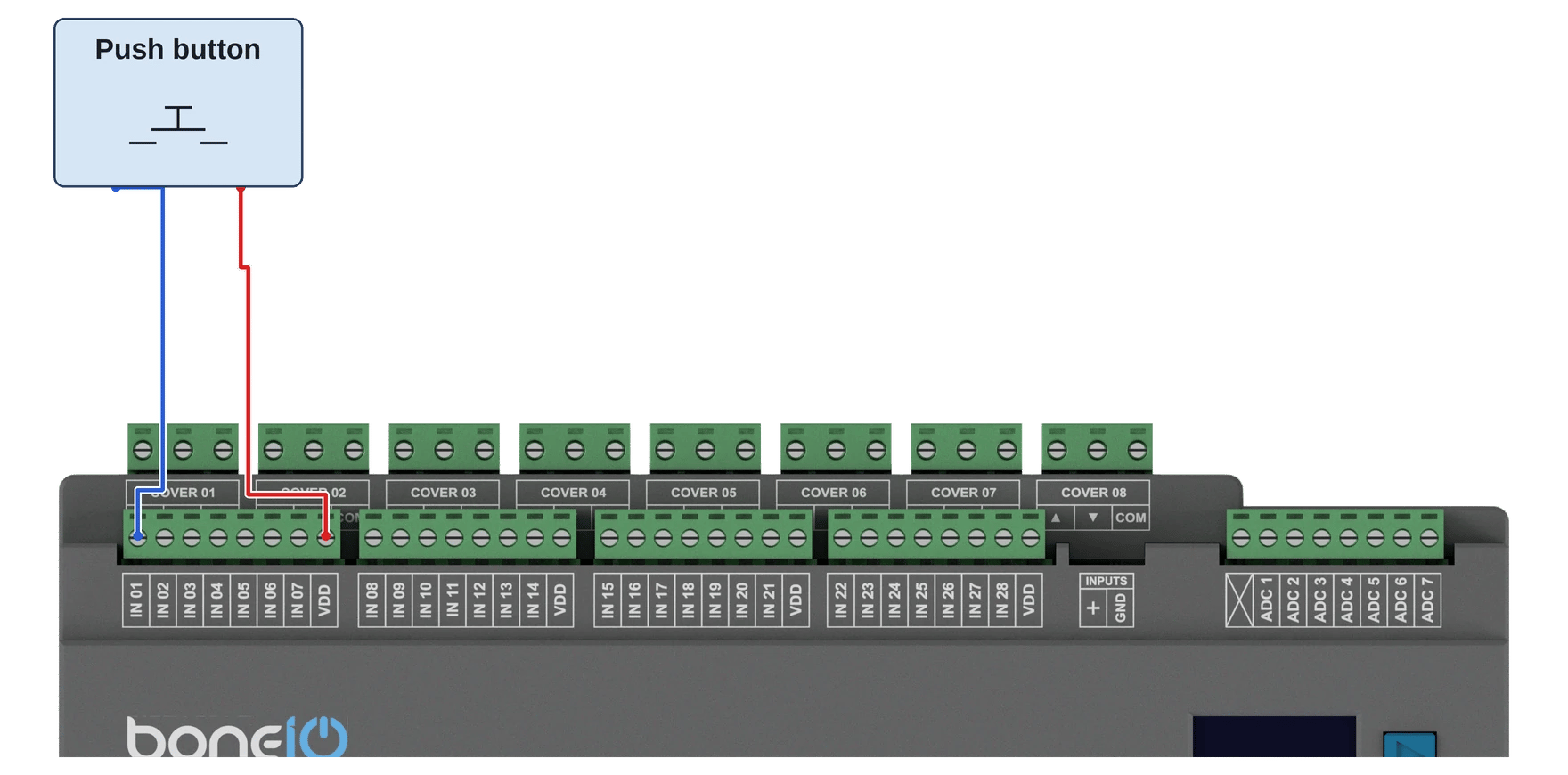
Digital inputs are used to connect buttons and sensors. To change the potential used to control the inputs, use the switch on the casing marked INPUTS. By default, the inputs are controlled by ground (GND).
IMPORTANT: If you want to change the position of the switch - make sure you do it while the device is turned off!
- Connect one of the wires from a momentary switch to the common
GND(ground) terminal. - Connect the other wire to the desired input terminal (e.g.,
IN01). - Pressing the switch will short the input to ground, which will be interpreted as an "on" signal.
Logical diagram of connecting digital input
Example:
Example 2:
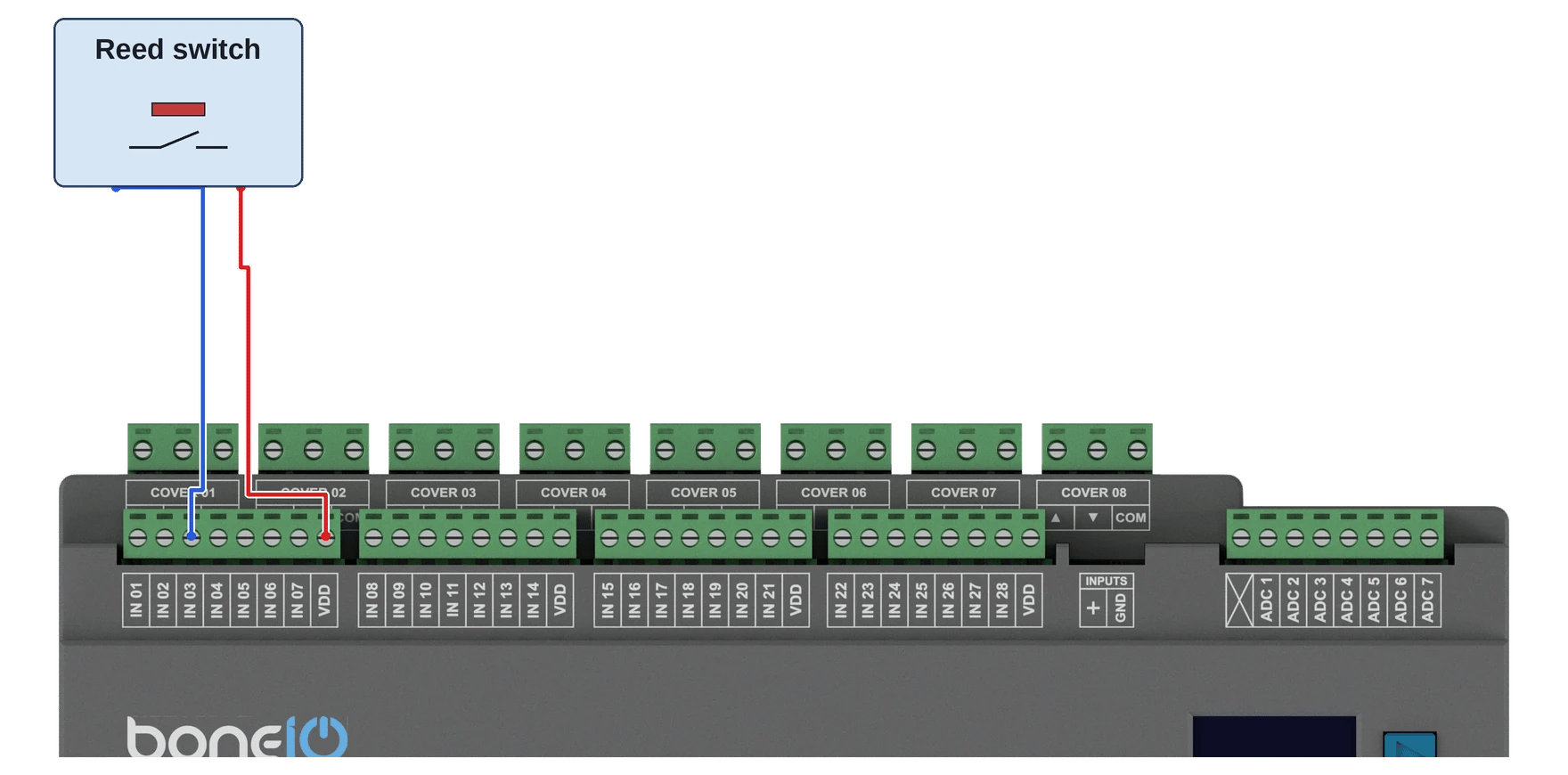
Example 3:
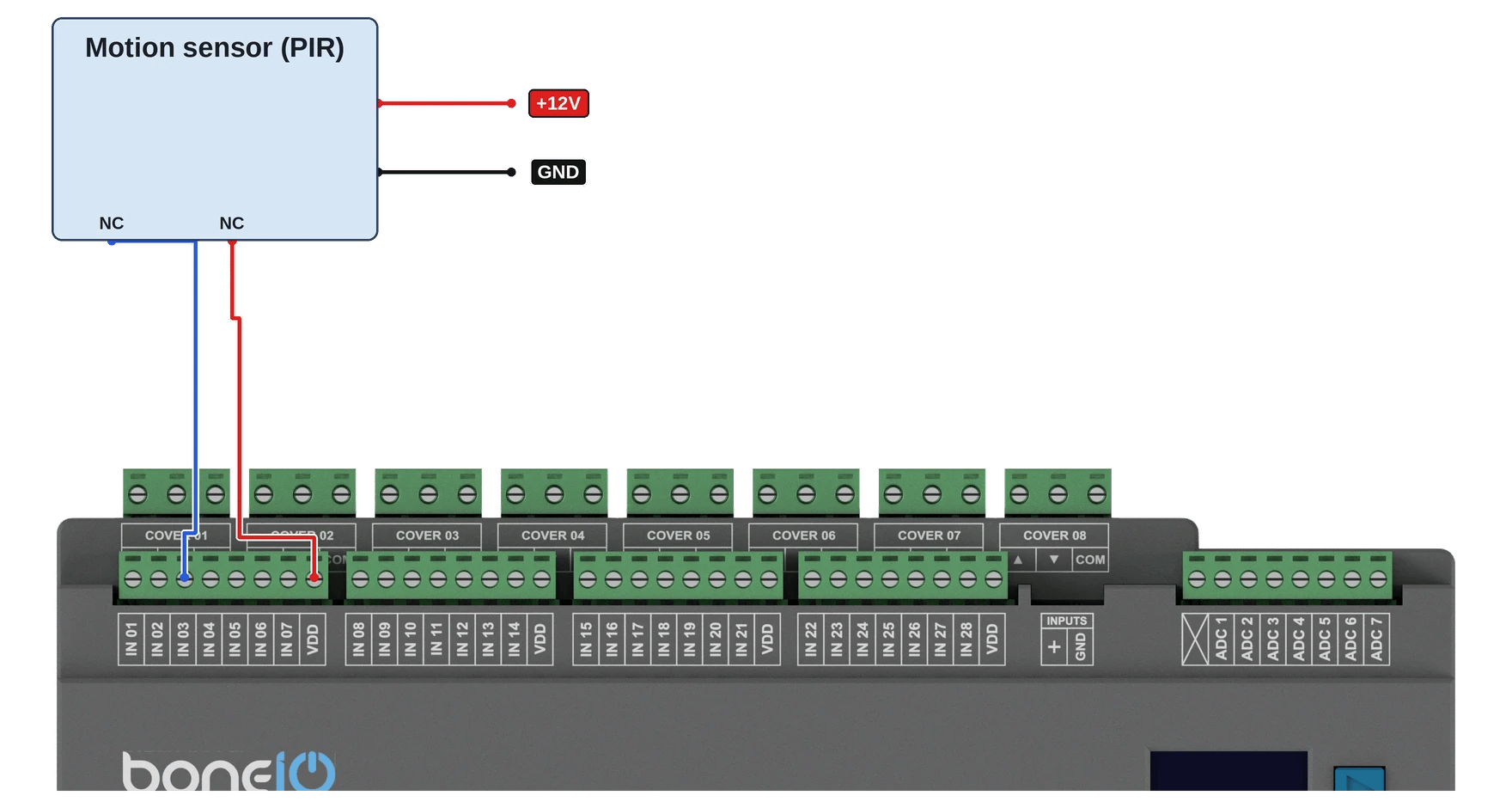
Connecting Relay Outputs (Cover Motors)
The key feature of the Cover version is that it has 32 relays, which are paired to control up to 16 roller shutter motors. Each pair of relays (e.g., Cover 01UP/DOWN, Cover 02 UP/DOWN) is protected by a hardware interlock to prevent simultaneous 'up' and 'down' signals, which protects the motor from damage.
Protection and Correct Wiring Order
It is critical that all overcurrent protection (Miniature Circuit Breakers, MCBs) and residual-current devices (RCDs) are installed in the circuit before the boneIO controller.
The current rating (in Amps) of the overcurrent protection must be sized appropriately for the planned load of the circuit (in this case - cover motors), but at the same time, it must not exceed the maximum rated current of the relay, which is 10A.
The correct current flow for the phase (L) wire is as follows:
RCD Protection -> Overcurrent Protection (MCB) -> COM terminal in boneIO -> UP/DOWN terminal in boneIO -> COVER
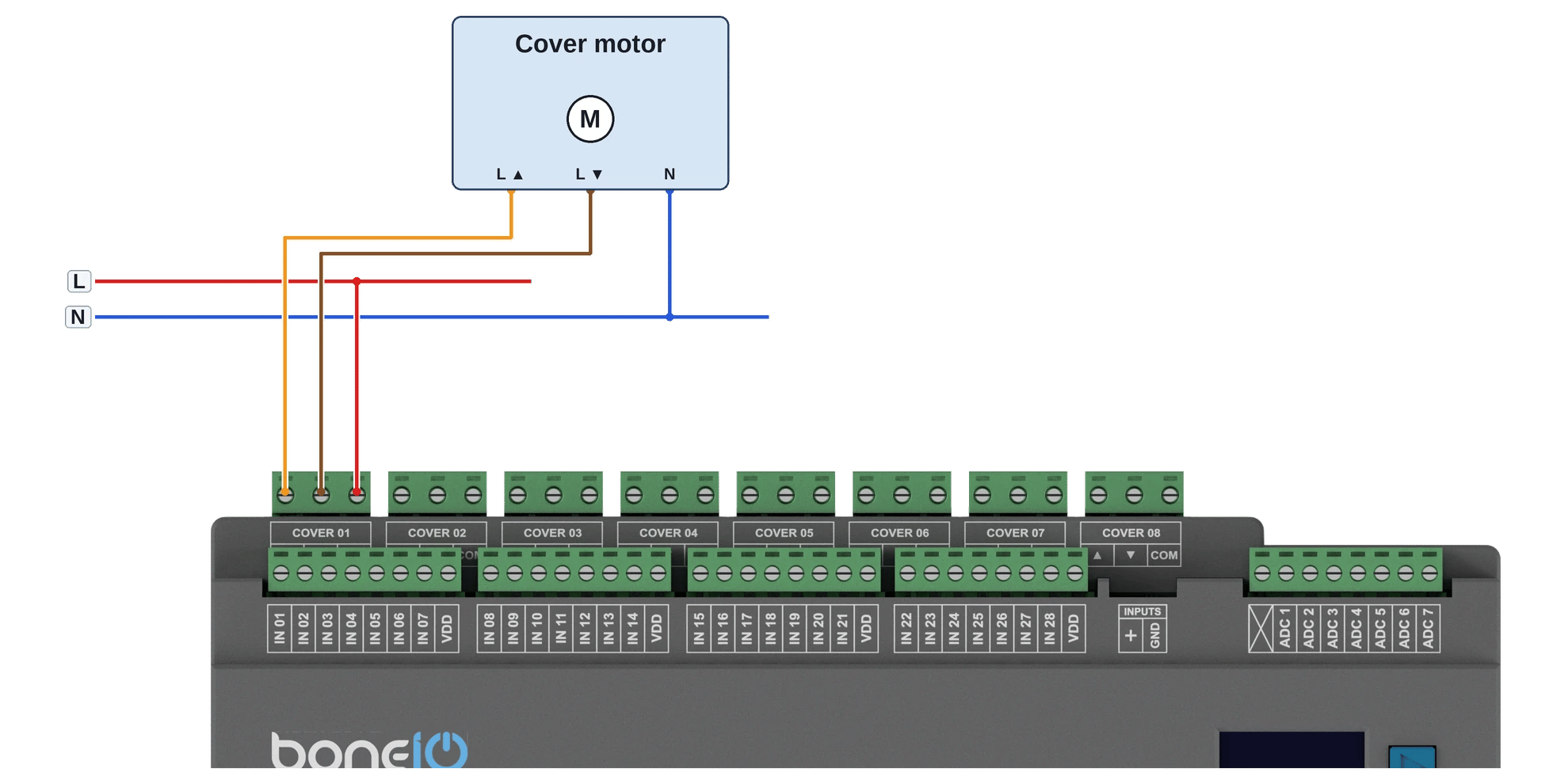
Example 1: Controlling a standard cover circuit
- Connect the phase wire (L), coming from the dedicated overcurrent protection (MCB ≤ 10A), to the
COMterminal of the selected Cover output (e.g.,Cover 01 COM). - Connect the wire leading to the Cover motor UP to the
UPterminal of the same output (e.g.,Cover 01 UP). - Connect the wire leading to the Cover motor DOWN to the
DOWNterminal of the same output (e.g.,Cover 01 DOWN). - Run the neutral wire (N) directly to the load (cover engine).
Logical Diagram
Safe Connecting of COM and OUT Terminals
In the boneIO controller, version Cover every two outputs (e.g., Cover 01 UP and DOWN) share a single common power terminal COM. This means that the phase wire (L) from a single circuit breaker supplies a pair of relays - with hardware interlock.
- REMEMBER, ensure that the relevant circuit breakers in the electrical cabinet are turned off.
- Connect the phase wire (L), coming from the overcurrent protection, to the appropriate COM terminal - tighten it with adequate force.
- Connect the wire leading to your load (e.g., a cover motor) to its corresponding output terminal - tighten it with adequate force.
- Run the neutral (N) wire directly from the neutral bar to the load.
Connecting Communication Buses
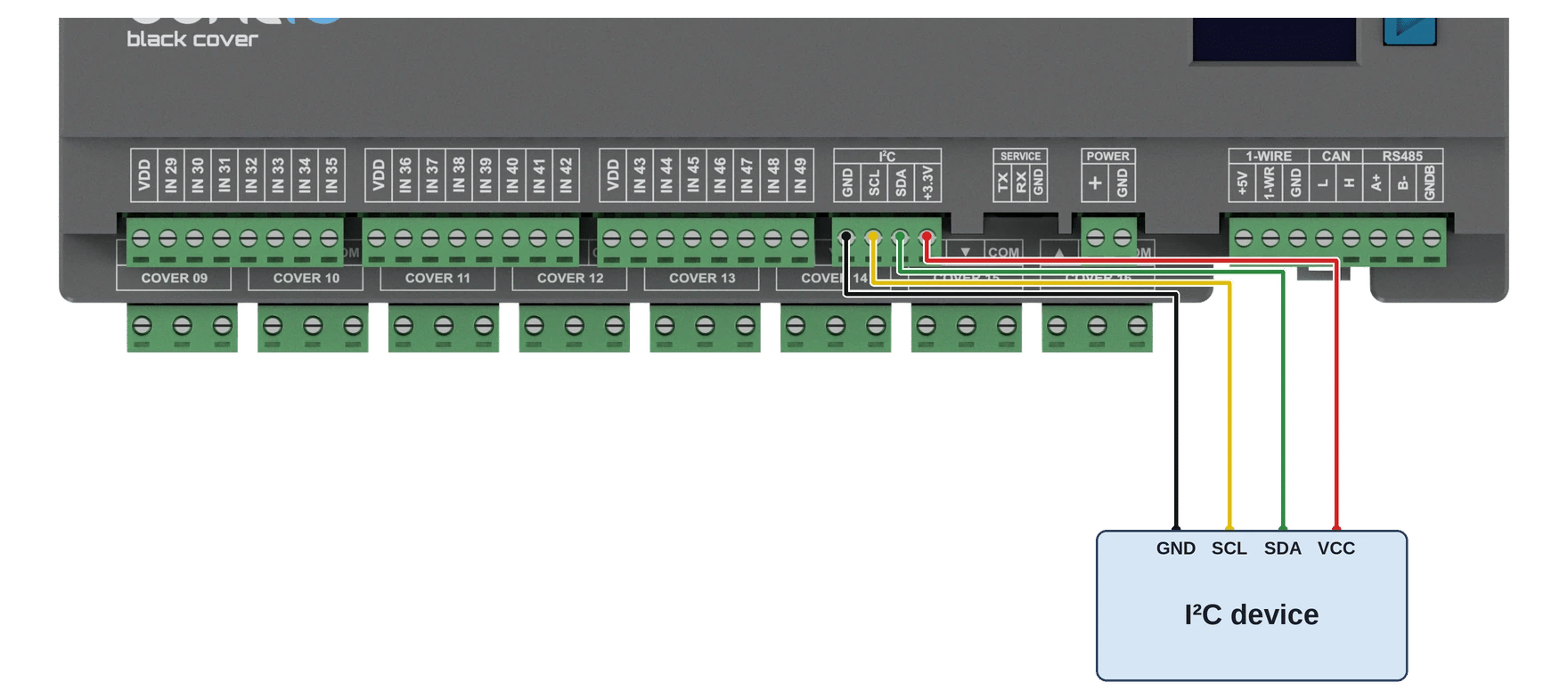
I2C Bus
For connecting additional sensors and expanders over short distances.
- Connect the
SDAline to theSDAterminal. - Connect the
SCLline to theSCLterminal. - Also, connect the
VCCandGNDpower for the sensor.
Analog Inputs ADC
Analog inputs read sensors that give a voltage instead of on/off — level, humidity or pressure transmitters and the like. boneIO Black has 7 of them, ADC 1–ADC 7. How they are wired depends on the controller version: controllers from 1.0 have a SERVICE port next to POWER, older ones do not.
Controllers from version 1.0 (with a SERVICE port)
- Every input has its own protected, buffered input stage, so it takes 0–13.8 V on the terminal — a 0–10 V transmitter connects without an external divider.
- The terminal marked X next to ADC 1 is AGND, the analog ground. Connect the sensor's ground there.
- These controllers have no ADC PWR terminal.
- The default filter (multiply by 1.8) shows the voltage after the input stage, about 0.13 of the voltage on the terminal. To read the voltage on the terminal itself, set multiply to 13.8. See ADC.
Examples:
- 0–10 V transmitter (humidity, pressure, level…): +24V from the POWER terminal to the transmitter's supply, its output to an ADC terminal, its ground to X (AGND). With multiply set to 13.8 the panel shows 0–10 V.
- NTC 10 kΩ thermometer: from +3.3V (the I²C terminal) through the NTC to an ADC terminal, and a 10 kΩ resistor
from that terminal to X (AGND). The terminal never sees more than 3.3 V. The panel shows a voltage, not a temperature —
the app has no thermistor curve, so convert it in Home Assistant. With multiply at 13.8, the NTC's resistance is
R = 9.2 kΩ × (3.3 − U) / U, whereUis the reading in volts and 9.2 kΩ is the 10 kΩ resistor in parallel with the input's own 115 kΩ. The temperature follows from the NTC's B value in its datasheet. - The same thermometer from +5V: the NTC takes +5V from the 1-WIRE block instead, the 10 kΩ resistor stays.
A higher supply gives a larger swing per degree, so a finer reading. The terminal never sees more than 5 V, and the
resistance is
R = 9.2 kΩ × (5 − U) / U. That +5V also powers the 1-Wire sensors; the NTC draws about 0.3 mA.
Ground the sensor on X (AGND) rather than on any GND terminal: it is the same ground, but on its own path, so the current of the relays and the processor does not flow through the wire the voltage is measured against.
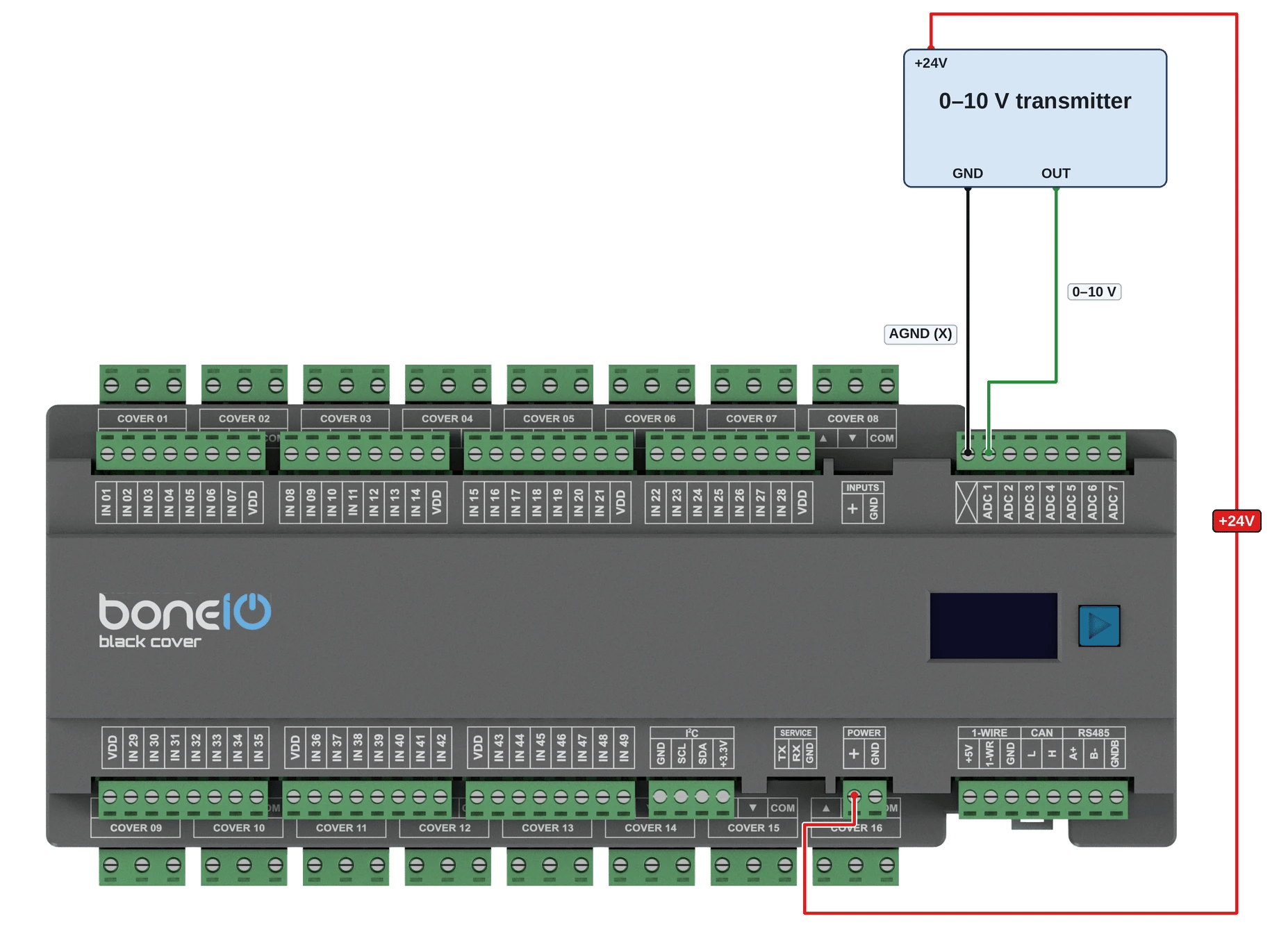
A 0–10 V transmitter powered from +24V.
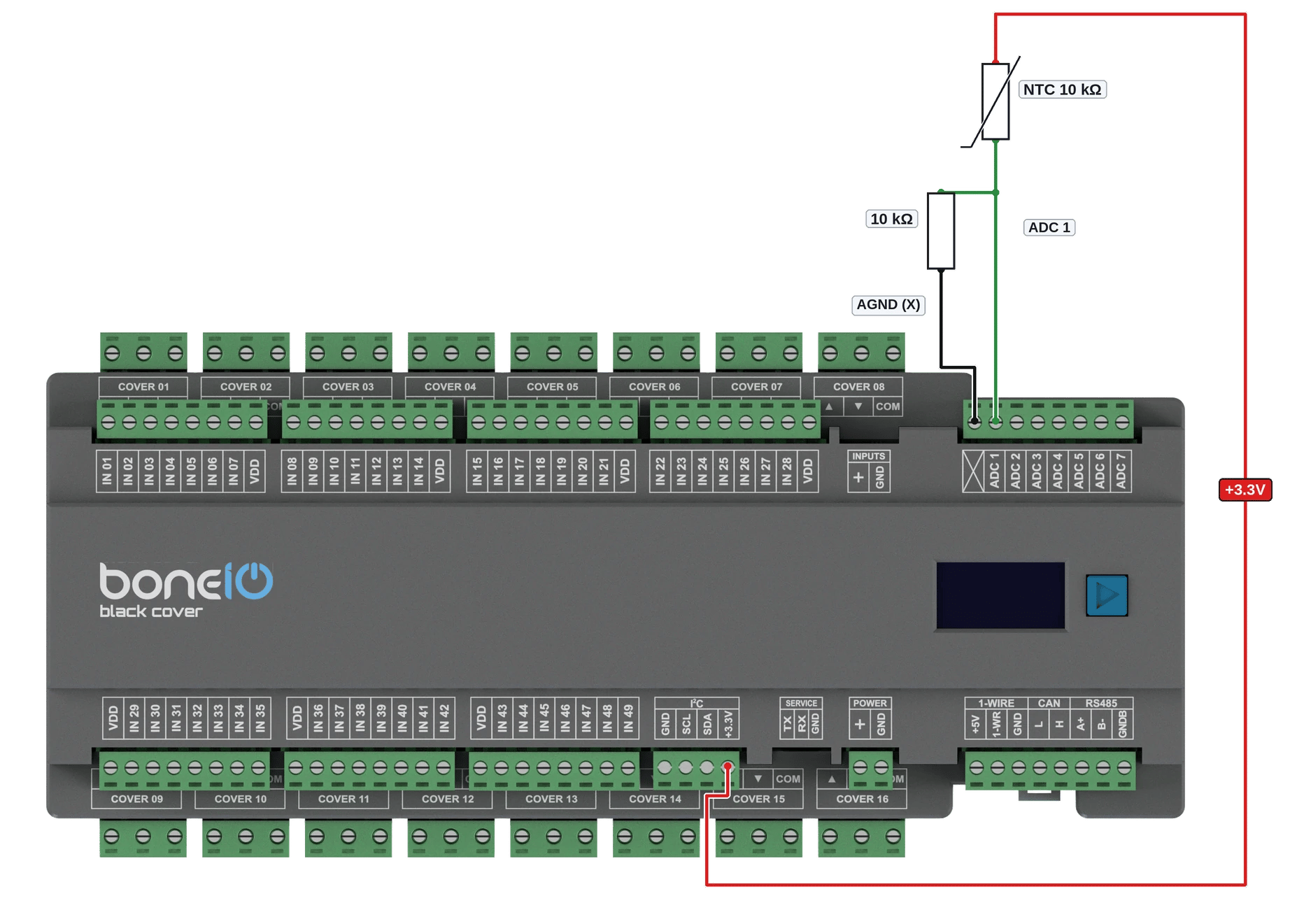
An NTC 10 kΩ thermometer powered from +3.3V.
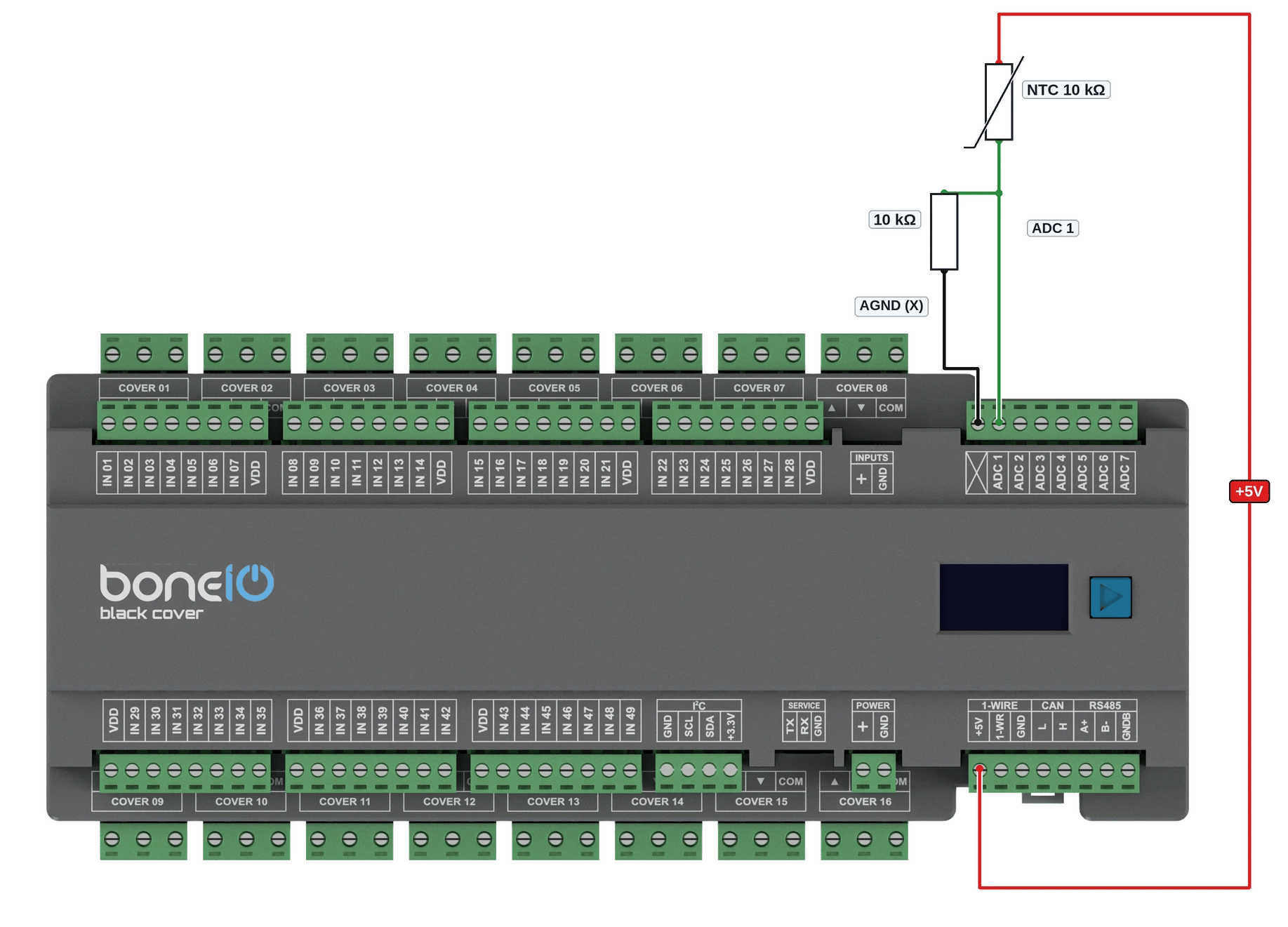
The same thermometer powered from +5V.
Controllers before version 1.0 (no SERVICE port)
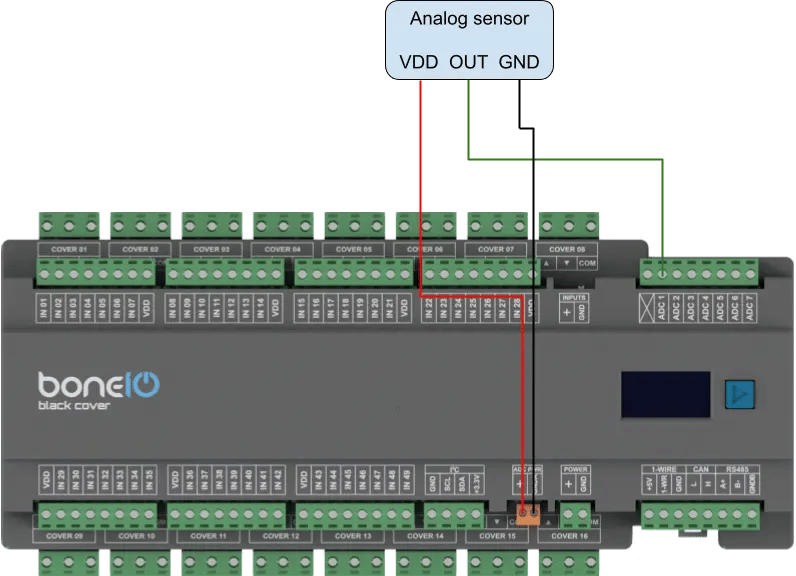
On these controllers the terminals go straight to the BeagleBone Black processor. Never apply more than 1.8 V — a higher voltage damages it. A sensor with a higher output needs an external voltage divider.
- The sensor takes its power from the ADC PWR terminal: + is the 1.8 V ADC reference, GNDA the analog ground. The terminal marked X is not connected.
- The default filter (multiply by 1.8) shows the voltage on the terminal.
The diagram below is for controllers before 1.0.
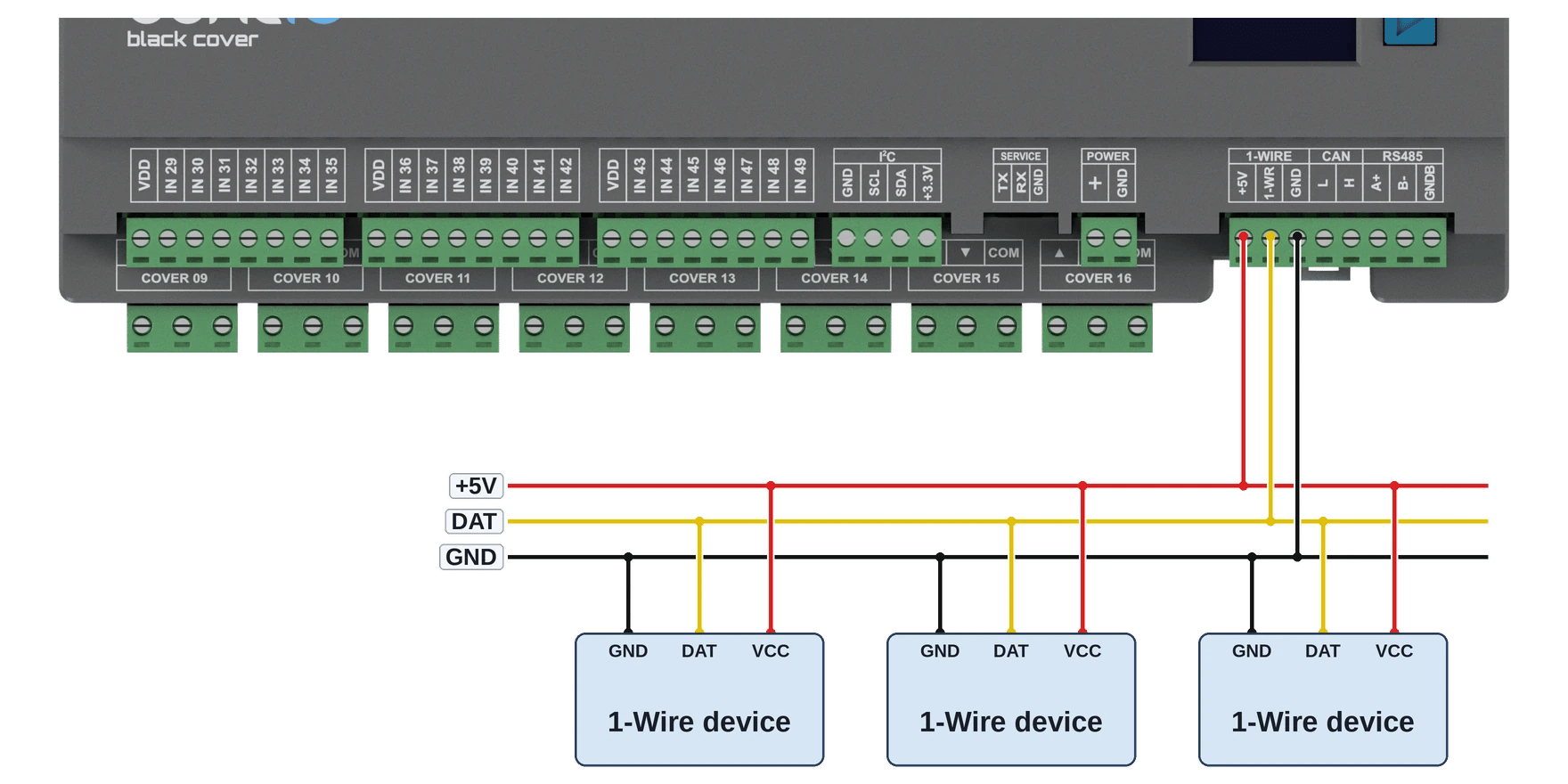
1-Wire Bus
Popular for connecting temperature sensors (e.g., DS18B20).
- Connect the
DATAline to the1-Wireterminal. - Also, connect
VCCandGNDpower.
The maximum length of the bus cable is 20m.
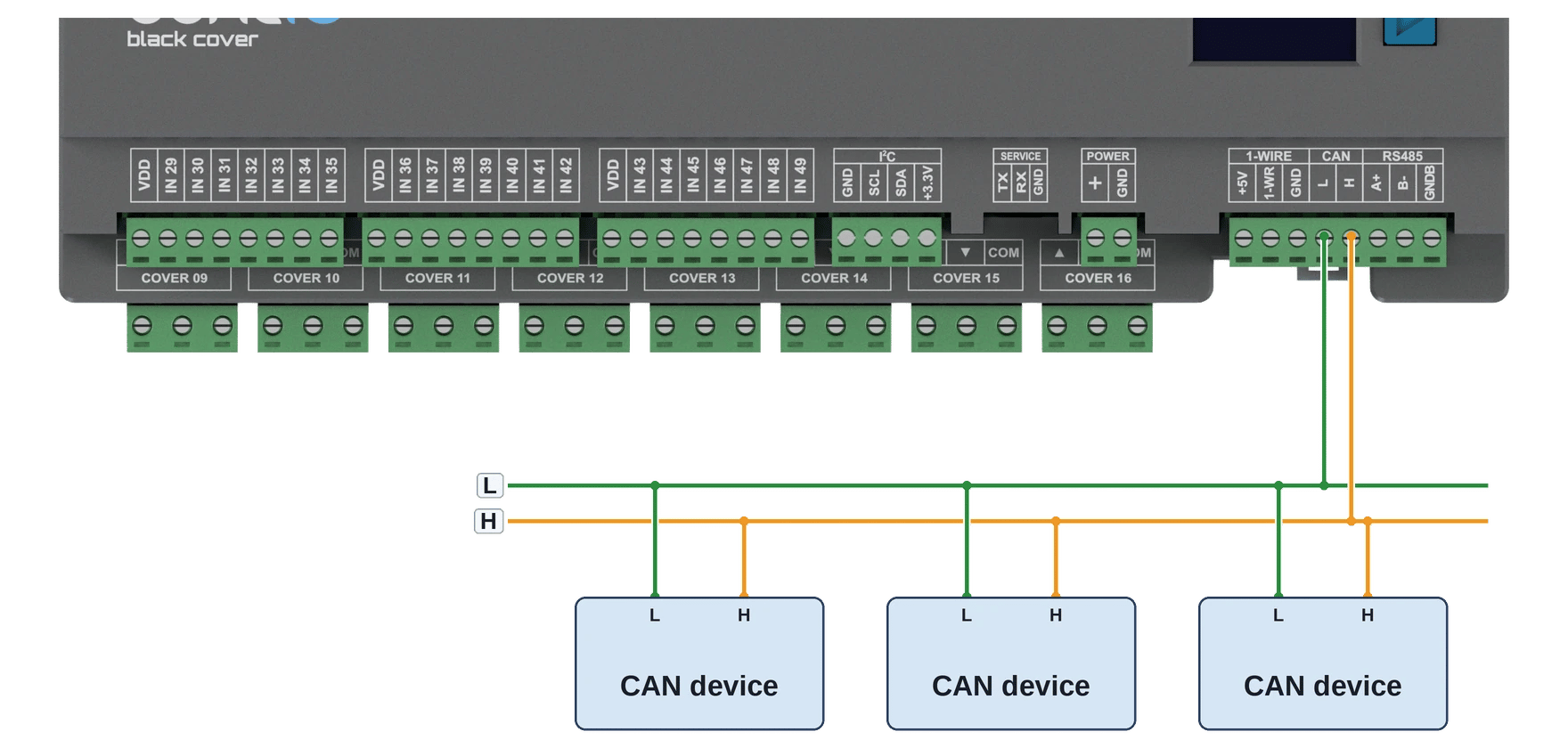
CAN
Used for communication with industrial HVAC devices and sensors.
- Connect the
Lline of the bus to theLterminal on the boneIO. - Connect the
Hline of the bus to theHterminal on the boneIO.
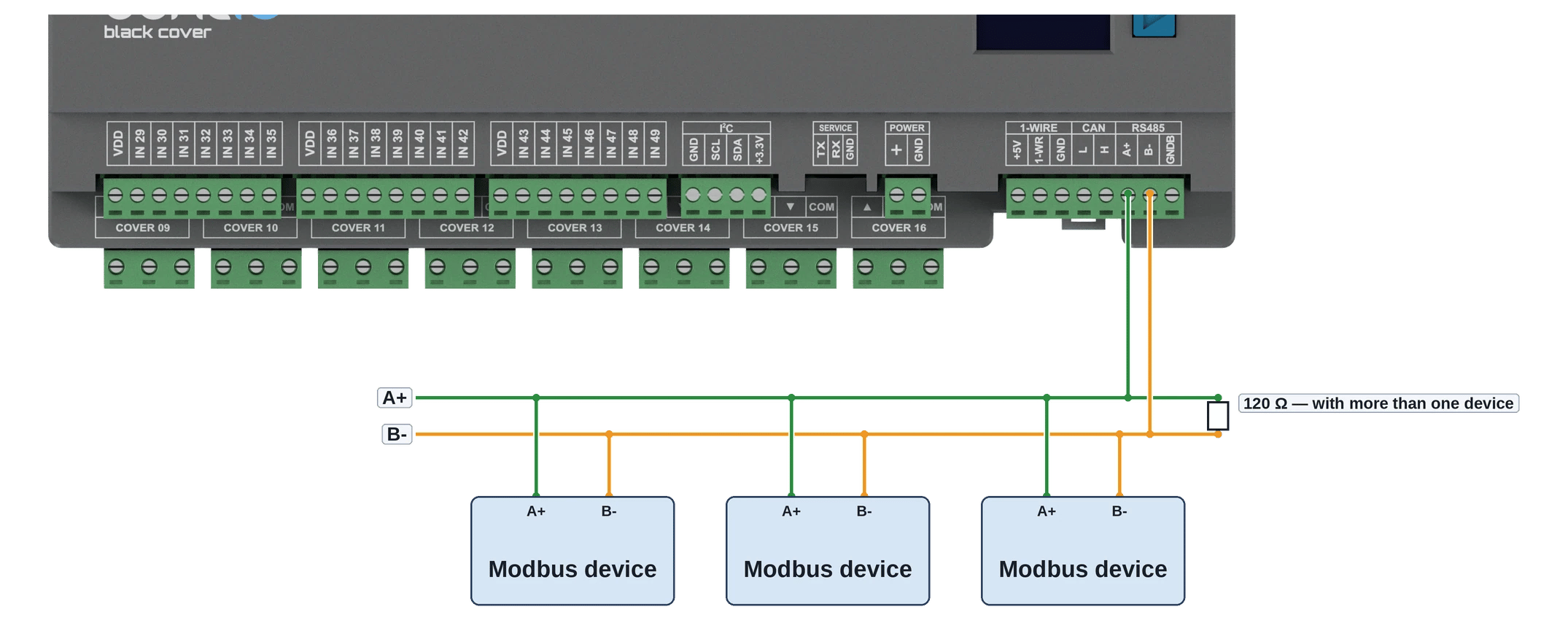
Modbus RS485
Used for communication with industrial and HVAC devices.
- Connect the
Aline of the bus to theAterminal on the boneIO. - Connect the
Bline of the bus to theBterminal on the boneIO.