Adding Modbus Device
This guide explains how to add support for a new Modbus device (sensor, energy meter, etc.) to boneIO Black. The device definition is stored as a JSON file that describes how to read and interpret Modbus registers.
Web Application - Device Creator
The easiest way to create a new Modbus device definition is using the built-in Modbus Device Creator in the web interface.
Accessing the Creator
- Open the boneIO web interface
- Navigate to Modbus Helper section
- Select the Creator tab
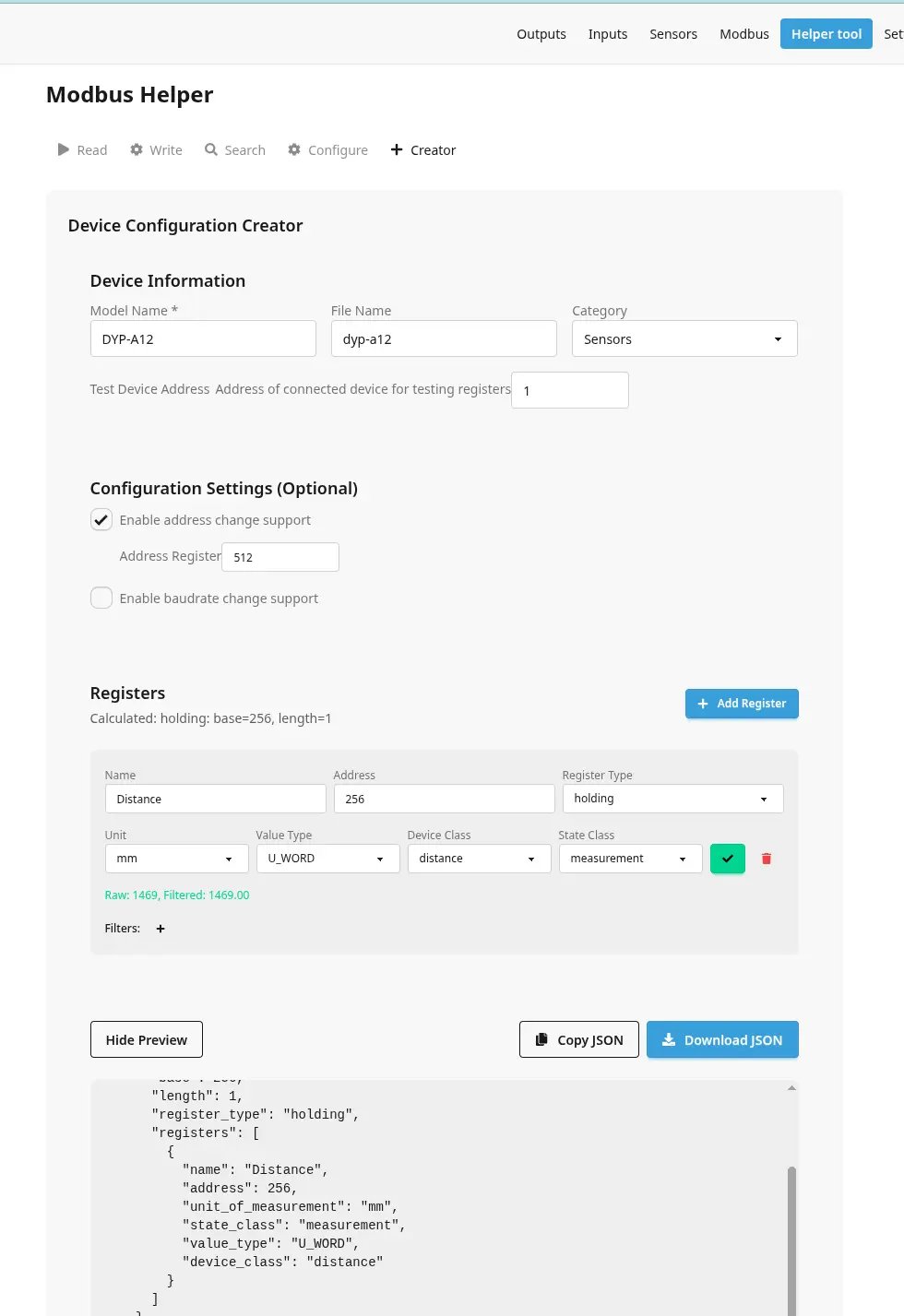
Device Information
| Option | Description |
|---|---|
| Model Name | Device model name displayed in Home Assistant (e.g., "SHT30 Temperature and Humidity Sensor") |
| File Name | Name for the JSON file (e.g., "sht30"). If empty, it will be generated from model name |
| Category | Device category: sensors, energy_meters, hvac, inverters, or other |
| Test Device Address | Modbus address of a connected device for testing registers |
Adding Registers
Click Add Register to define each data point you want to read from the device.
| Option | Description |
|---|---|
| Name | Sensor name displayed in Home Assistant |
| Address | Modbus register address (check device documentation) |
| Register Type | holding or input register |
| Unit | Unit of measurement (e.g., °C, %, V, A, kWh) |
| Value Type | Data type - see table below |
| Device Class | Home Assistant device class (temperature, humidity, voltage, etc.) |
| State Class | measurement, total, or total_increasing |
Value Types
| Type | Description | Size |
|---|---|---|
| U_WORD | Unsigned 16-bit integer | 1 register |
| S_WORD | Signed 16-bit integer | 1 register |
| U_DWORD | Unsigned 32-bit integer (Big Endian) | 2 registers |
| S_DWORD | Signed 32-bit integer (Big Endian) | 2 registers |
| U_DWORD_R | Unsigned 32-bit integer (Little Endian) | 2 registers |
| S_DWORD_R | Signed 32-bit integer (Little Endian) | 2 registers |
| FP32 | 32-bit float (Big Endian) | 2 registers |
| FP32_R | 32-bit float (Little Endian) | 2 registers |
| U_QWORD | Unsigned 64-bit integer | 4 registers |
| S_QWORD | Signed 64-bit integer | 4 registers |
Filters
Filters allow you to transform raw register values. Click the + button next to "Filters" to add:
- Multiply - Multiply the value (e.g.,
0.1to convert 245 → 24.5°C) - Offset - Add/subtract a value
Testing Registers
Before saving, you can test each register by clicking the ▶ button. This reads the actual value from a connected device to verify the configuration is correct.
Set Base Configuration (Optional)
Enable these options if the device supports changing its Modbus address or baud rate:
| Option | Description |
|---|---|
| Enable Set Address | Device supports changing Modbus address |
| Address Register | Register address for writing new Modbus address |
| Enable Set Baudrate | Device supports changing baud rate |
| Baudrate Register | Register address for writing baud rate |
| Baudrate Mappings | Map baud rates to register values (e.g., 9600 → 0, 19200 → 1) |
Exporting
- Show JSON Preview - Preview the generated configuration
- Copy JSON - Copy to clipboard
- Download JSON - Download as a file
JSON File Structure
Device definitions are stored in boneio/modbus/devices/<category>/ directory.
Sample Configuration
{
  "model": "SHT30 Temperature and Humidity Sensor",
  "set_base": {
    "set_address_address": 256
  },
  "registers_base": [
    {
      "base": 1,
      "length": 2,
      "register_type": "holding",
      "registers": [
        {
          "name": "Temperature",
          "address": 1,
          "unit_of_measurement": "°C",
          "state_class": "measurement",
          "device_class": "temperature",
          "value_type": "S_WORD",
          "filters": [
            { "multiply": 0.1 }
          ]
        },
        {
          "name": "Humidity",
          "address": 2,
          "unit_of_measurement": "%",
          "state_class": "measurement",
          "device_class": "humidity",
          "value_type": "S_WORD",
          "filters": [
            { "multiply": 0.1 }
          ]
        }
      ]
    }
  ]
}
Configuration Variables
Root Level
| Variable | Required | Description |
|---|---|---|
| model | Yes | Model name displayed in Home Assistant |
| set_base | No | Configuration for changing device address/baudrate |
| registers_base | Yes | Array of register blocks |
set_base
| Variable | Description |
|---|---|
| set_address_address | Register address for writing new Modbus address |
| set_baudrate.address | Register address for writing baud rate |
| set_baudrate.possible_baudrates | Map of baud rate to register value |
registers_base (Block)
| Variable | Description |
|---|---|
| base | Starting register address for this block |
| length | Number of registers to read in one request |
| register_type | holding or input |
| registers | Array of register definitions |
registers (Individual Register)
| Variable | Required | Description |
|---|---|---|
| name | Yes | Sensor name in Home Assistant |
| address | Yes | Register address |
| unit_of_measurement | Yes | Unit (°C, %, V, A, etc.) |
| state_class | Yes | measurement, total, or total_increasing |
| device_class | No | HA device class |
| value_type | Yes | Data type (see Value Types table) |
| filters | No | Array of filters to apply |
Contributing Your Device
After creating and testing your device definition:
- Fork the boneIO repository
- Add your JSON file to the appropriate folder:
boneio/modbus/devices/sensors/- sensors (temperature, humidity, distance)boneio/modbus/devices/energy_meters/- energy metersboneio/modbus/devices/hvac/- HVAC devicesboneio/modbus/devices/inverters/- invertersboneio/modbus/devices/other/- other devices
- Create a Pull Request
Your contribution will help other users with the same device!